
Maan Win Balance Record, Game History And Statistics
Maan Win balance record shows account money movement, while Game History and Game Statistics help you check play activity after you log in. These three areas are useful when your Deposit, Withdraw, Balance or game result needs a second look.
You can find Balance Record, Game History and Game Statistics from the Profile area after Login. A careful player checks these records before contacting Live Support because support teams usually need the exact issue type and timing.
For payment issues, compare the record with the Deposit page, Withdrawal page and Wallet timing first. For more account issue topics, the Maan Win blog keeps related help pages in one place.
- Record Area
- Profile
- Money Record
- Balance Record
- Play Record
- Game History
- Stats Area
- Game Statistics
- Deposit Credit
- 1-5 minutes
- Withdrawal Time
- About 24 hours
On This Page
Where To Find Balance Record, Game History And Game Statistics
The Profile page lists Balance Record, Game History and Game Statistics in the account options. You must be logged in because these records are linked to your own Balance, deposits, withdrawals and games.
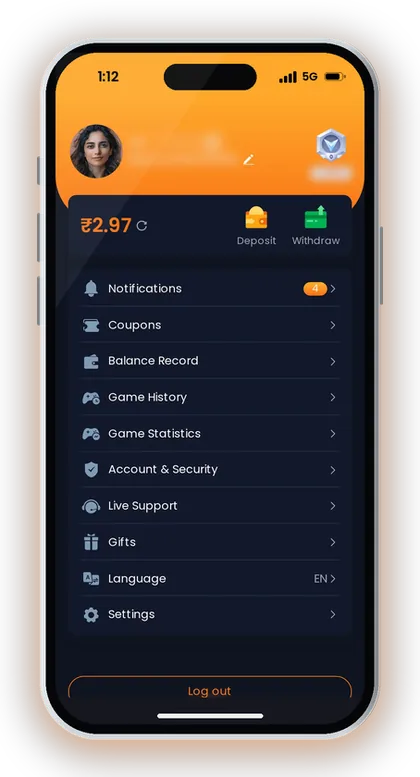
On the Account page, you also see Deposit, Withdraw, Notifications, Coupons, Account & Security, Live Support, Gifts, Language, Settings and Log out. For record checking, do not start with support first; start with the record that matches the issue.
If your issue is money related, open Balance Record before raising a ticket. If your issue is a game result, open Game History first and then check Game Statistics for your wider play pattern.
| Area | Best Use | When To Check |
|---|---|---|
| Balance Record | Money movement | After Deposit or Withdraw |
| Game History | Game rounds and results | After a disputed game |
| Game Statistics | Play activity view | Before judging your pattern |
Which Record Should You Open First?
Balance Record is the first place for Deposit, Withdraw and Balance checks. Game History is the first place for a round result, a lottery period or a casino game session.
Game Statistics is useful when you want to understand your own play volume and not just one round. New players often mix these three areas and then send a weak complaint without the right record.
Good To Know: Take a screenshot of the matching record before you contact Live Support, because it helps you explain the issue clearly.
How Maan Win Balance Record Helps With Money Checks
Maan Win balance record is the practical place to compare your Wallet movement against your visible Balance. It matters most when a Deposit shows paid in your UPI app but the app Balance has not changed.
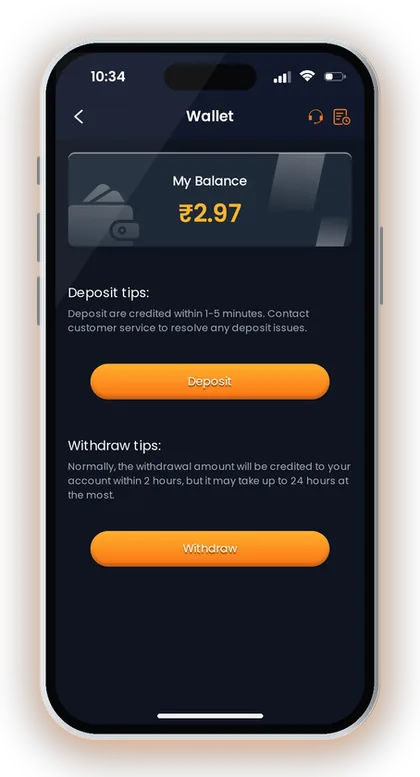
The Wallet page says deposits are credited within 1-5 minutes and deposit issues should go to customer service. That short timing means you should wait a few minutes, refresh the account, and then check the record instead of paying again.
For withdrawals, the Wallet page says the amount is normally credited within 2 hours but may take up to 24 hours at the most. The Withdrawal page also says the withdrawal amount will arrive in about 24 hours under normal circumstances.
A common mistake is checking only the top Balance and ignoring the record below it. The Balance can update after the transaction record, so the record gives you a better trail for support.
- Check the latest Balance after returning to the Maan Win Deposit page.
- Open Balance Record and compare the amount shown there.
- Wait for the app timing before raising a support request.
- Keep the UPI payment proof or withdrawal request details ready.
What To Match In The Record
Match the amount, the transaction type and the latest Balance movement. If you deposited ₹500 by UPI and the Balance did not update, your first check is whether the ₹500 entry appears in Balance Record.
If the entry appears but the Balance looks wrong, the issue is different from a missing Deposit. If no entry appears after the waiting time, treat it as a payment not credited issue.
Why Timing Matters
A Deposit that is still inside the 1-5 minute credit window should not be reported as missing too early. A withdrawal that is still inside the about 24 hours window should be tracked with its status and record first.
Experienced players avoid repeated payments during a delay. Repeating the same amount without checking Balance Record can create two separate issues instead of one clean support request.
Good To Know: For real-money play, set a daily playing budget before you Deposit and stop when that limit is used.
Using Balance Record After A Deposit
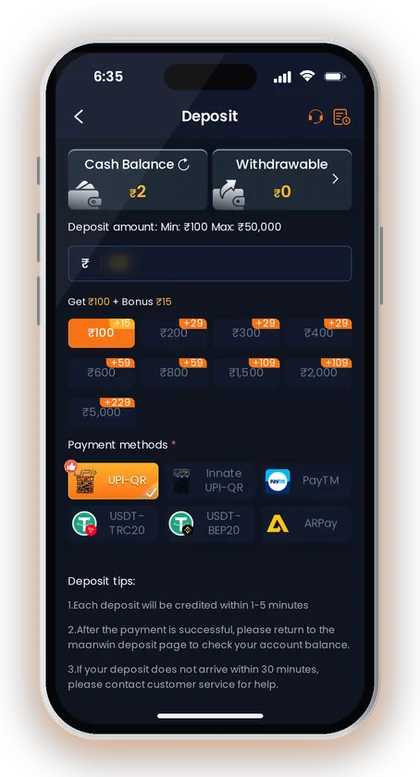
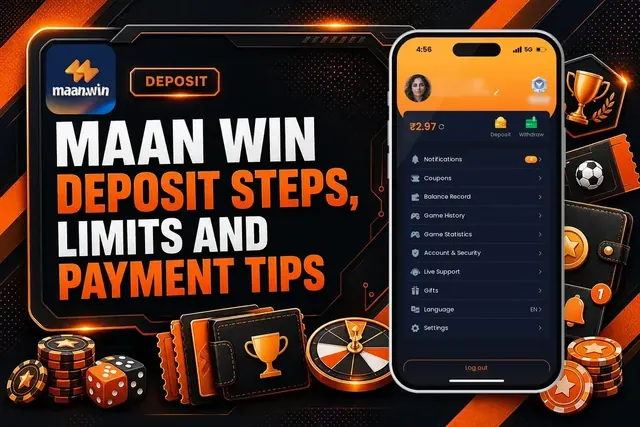
The Deposit page shows UPI, USDT and ARPay options, and deposits are credited within 1-5 minutes. Before using Maan Win deposit, decide the amount carefully because the page says not to modify the payment amount.
The Deposit page also says you should return to the Maan Win deposit page after successful payment to check your account Balance. This matters because a UPI app may show success before the gaming Wallet updates.
If a Deposit does not arrive within 30 minutes, the page says to contact customer service for help. Before sending the issue, open Balance Record and confirm whether the money entry is missing or only the visible Balance is delayed.
Do not reuse saved QR codes or UPI accounts for multiple payments because the Deposit notes warn against it. Saved payment details can break the match between the payment and the account record.
- Return to the Maan Win Deposit page after payment.
- Check your Balance and then open Balance Record.
- Match the amount with your UPI, USDT or ARPay payment.
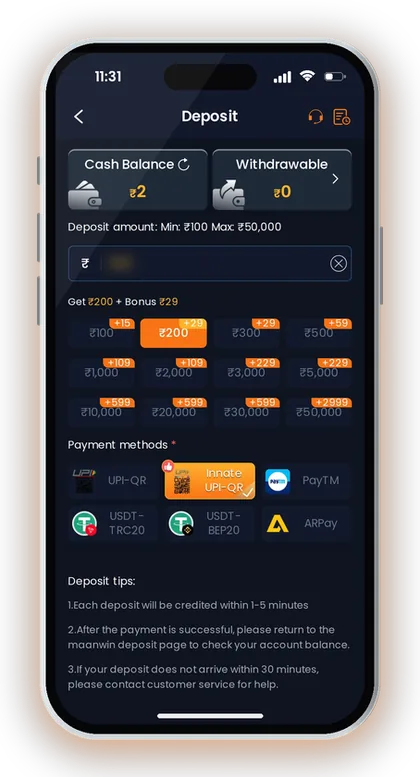
- Wait up to 30 minutes before treating it as not received.
- Contact customer service with proof if the record is still missing.
When The Deposit Does Not Show
If your Maan Win payment is successful but Balance Record has no matching entry after the stated wait, use Maan Win deposit not received for the next checks. Keep the exact amount and payment proof ready before contacting support.
Do not create a new Deposit just to test the account. One clean missing-payment case is easier to resolve than two paid amounts with mixed screenshots.
Good To Know: Never change the amount shown on the Deposit page, because the record matching depends on the correct payment amount.
Using Balance Record Before A Withdrawal Complaint
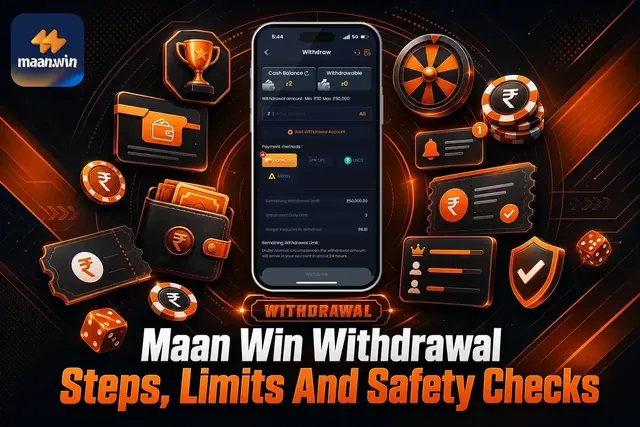
The Withdrawal page supports BankCard, UPI, USDT and ARPay for withdrawing money. Before using Maan Win withdrawal, check Withdrawable amount, any bet requirement shown on the page, and the method selected.
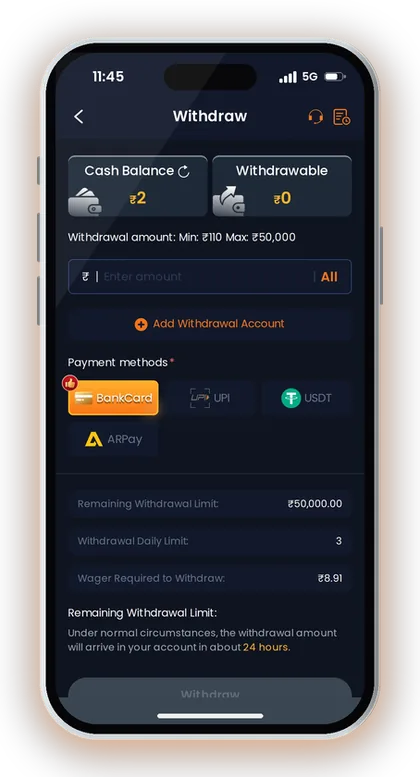
BankCard and UPI withdrawals show a minimum of ₹110 and a maximum of ₹50,000, while USDT shows a minimum of ₹1,000 and a maximum of ₹1,000,000. ARPay shows a minimum of ₹100 and a maximum of ₹50,000, and ARPay must be activated before use.
Each listed withdrawal method shows 3 withdrawals per day, and the page says the amount arrives in about 24 hours. If your bank or UPI account has not received money, first check whether the withdrawal request appears in Balance Record.
Many players report a withdrawal too early and then raise the same issue again. A better method is to note the withdrawal time, check the record, and wait for the normal arrival period unless the app shows an error.
- Confirm the withdrawal method before submitting.
- Check whether the request appears in Balance Record.
- Compare the request time with the about 24 hours arrival time.
- Do not submit repeated complaints for the same request.
- Use Live Support if the record and receiving account do not match.
When Withdrawal Is Still Pending
If the record shows a withdrawal but your bank, UPI, USDT or ARPay account has not received it, compare the request with the timing first. For pending cases, use Maan Win withdrawal pending after checking the method and daily count.
If you selected the wrong withdrawal account, the issue may need account correction through support options such as Delete Withdraw Bank Account and Rebind, Delete UPI and Rebind, or Delete Old USDT Address and Rebind.
Good To Know: Add or bind only your correct withdrawal account because wrong bank, UPI or USDT details can slow down a valid request.
Reading Maan Win Game History Correctly
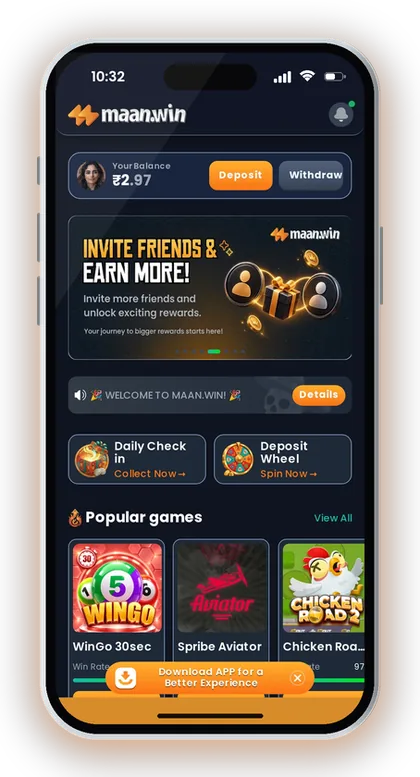
Maan Win game history is used to check rounds and results after you play games such as WinGo 30sec, WinGo 1 Min, WinGo 3 Min and WinGo 5 Min. In WinGo, the live page shows Time remaining, colours, Big, Small, Game history, Chart and My history.
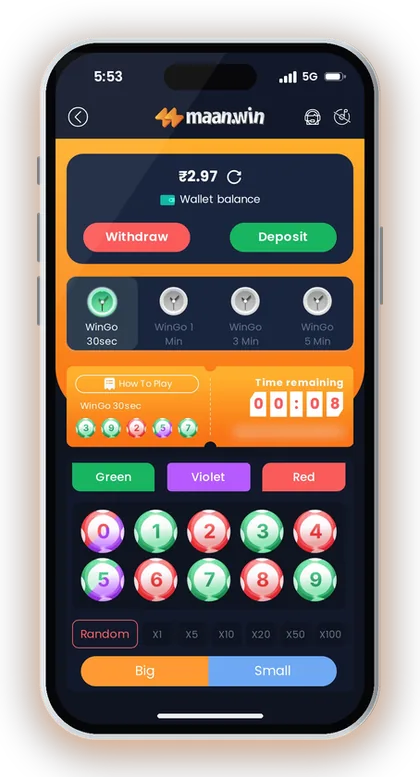
For WinGo 30sec, the round is very fast, so mistakes happen when players remember the wrong period. Always compare the period number and result instead of relying on memory.
Game History is not a prediction tool. It is a record of what happened, and colour, lottery, crash, casino and slots outcomes can still change round by round.
A practical check is simple: open My history for your own entries, then compare the public Game history only for the same period. Do not compare your entry with the next period by mistake.
Fast Rounds Need More Care
WinGo 30sec moves quicker than 1 Min, 3 Min and 5 Min rounds. If you are new, longer rounds give you more time to check colour, Big or Small and confirm your amount before the timer closes.
Experienced players avoid placing a late bet when the timer is close to zero. A late tap can create confusion if the app moves to the next period.
Crash And Casino Records
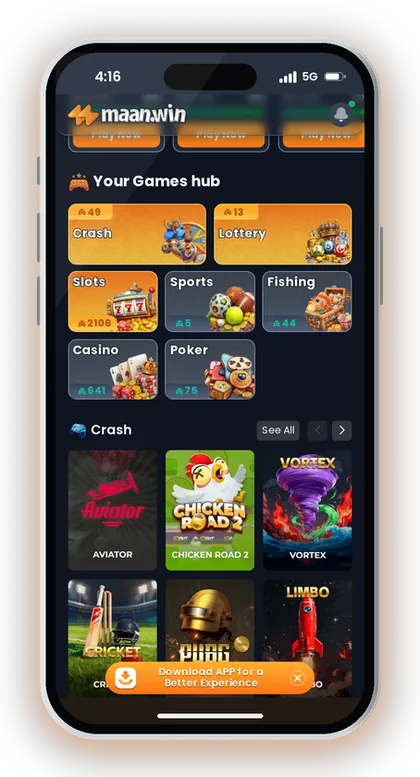
Crash games on Maan Win include names such as PUBG 1MIN, Chicken Road, Plinko, Javelin, DragonTiger, Goal, Coinflip, Dice and Cryptos. For these games, check the session or round record instead of judging only the visible result screen.
Casino games include Roulette, Dragon Tiger, Baccarat, Sicbo, Blackjack and other table games. Table games can feel slower than 30sec lottery rounds, but you should still save the record when a result looks unclear.
Good To Know: Use 1 Min, 3 Min or 5 Min rounds if you need more time to check the period and avoid rushed taps.
What Maan Win Game Statistics Can And Cannot Tell You
Maan Win game statistics appears in the Profile options beside Game History. It helps you check your wider play activity instead of only one round or one transaction.
Game Statistics can support better budget control because it pushes you to look at activity as a pattern. If you only remember one win and ignore many small losses, your playing budget can disappear faster than expected.
Statistics cannot prove that the next WinGo, Aviator, slot, casino or poker result will go your way. Random games do not become safe because a chart looks friendly.
Use statistics for discipline, not confidence. If the numbers show too much play in one category, reduce the amount or stop for the day instead of increasing the next bet.
- Use statistics to control time spent in one category.
- Use Game History to check one game result.
- Use Balance Record to check money movement.
- Stop playing when your planned amount is used.
Lottery, Slots And Casino Need Different Reading
Lottery games on Maan Win include WinGo, K3, 5D, TrxWinGo and Moto Racing. These games have clear periods, so statistics and history should be read with the exact period in mind.
Slots include JILI, JDB, INOUT, BGAMING, CQ9, EVO, SPRIBE and YGG providers in the Slots area. Slot records are better for checking spend and session control than for guessing the next result.
Sports, Fishing And Poker Activity
Sports providers on Maan Win include 9Wickets, ARBET, CMD and SABA. Fishing includes JILI, JDB, CQ9 and V8Card titles, while Poker includes Card365 games such as 3 Patti Classic, Rummy and Andar Bahar.
These categories have different speeds, so compare activity within the same category. A fast slot session and a slower poker session should not be treated as the same type of risk.
Good To Know: Treat statistics as a spending mirror, not as a result signal.
Maan Win Account Records And Live Support
The Customer Service area includes Self Service Center, FAQ, Deposit Not Received, Withdrawal Problem, IFSC Modification, Delete UPI and Rebind, and Game Problems. Use the correct option because support can process a clear issue faster than a mixed complaint.
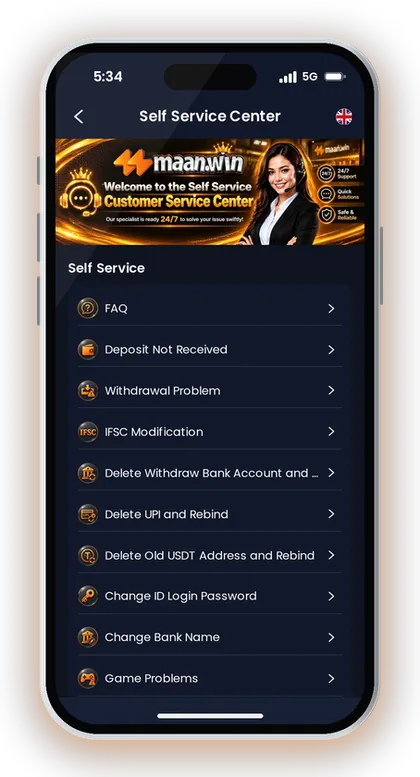
For money issues, attach the Balance Record details and the payment or withdrawal proof. For game issues, attach the Game History details and mention the game name, period or session.
The support page says that after submitting for review, you can use Progress Query to view the review results of the work order. This is important because repeated tickets for the same issue can make tracking harder.
Use Maan Win customer care when the record, Balance and payment proof do not match after the stated timing. Do not share your Login password or payment PIN while asking for help.
- Select the support option that matches the record.
- Add the amount for money issues.
- Add the game name and period for game issues.
- Use Progress Query after submitting the work order.
- Keep password and payment PIN private.
Which Support Option Fits Your Record
Choose Deposit Not Received when payment proof exists but Balance Record does not show the Deposit. Choose Withdrawal Problem when Balance Record shows a withdrawal and the receiving account has not got it after the expected time.
Choose Game Problems when the dispute is about WinGo, Aviator, slots, casino, fishing, sports or poker play. A game complaint without Game History details is usually too weak.
Good To Know: One clear ticket with record proof is better than several tickets with missing details.
Login And Security Checks Before You Blame The Record
The Login page uses +91 and shows Remember password, Forgot Password, Login and Register Now. If records look missing, first confirm that you used the correct mobile number on Maan Win login after Maan Win Game Download.
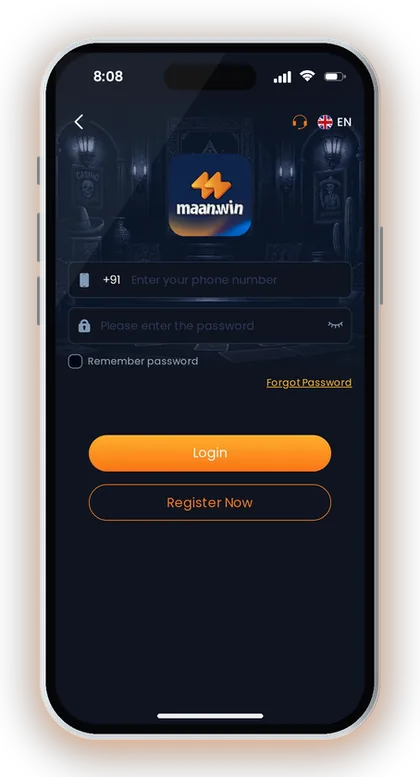
If you cannot enter the account, use Forgot Password instead of creating a second account. A new account will not show the old Balance Record, Game History or Game Statistics.
If you are new and need to Register before checking any record, the Invite Code field is required; enter PUWFKWN in the Invite Code field. Registration cannot be completed without an invite code.
The Account page includes Account & Security, Settings and Log out. Use Log out on a shared phone, and do not save your password on a device used by other people.
- Check the +91 mobile number before Login.
- Use Forgot Password if you cannot access the account.
- Register with invite code PUWFKWN if you are opening a new account.
- Log out on a shared phone.
- Do not share password, OTP or payment PIN.
Common Account Mistakes
Some players use one mobile number for Deposit and then log in with another number later. That creates the false feeling that Balance Record has disappeared.
Another common mistake is sharing the account with a friend. If someone else plays or withdraws, Game History and Balance Record will still show the account activity, not your personal memory.
Good To Know: Real-money gaming is for adults only, and you should stop if play starts affecting your daily expenses.
Maan Win Game Download Checklist For Indian Players
A good Maan Win record check starts with the issue type: money, game result, or account access. Money issues go to Balance Record, game issues go to Game History, and activity control goes to Game Statistics.
For a UPI Deposit, compare the UPI success screen with the Deposit page timing and Balance Record. For a withdrawal, compare the request record with the method selected and the about 24 hours arrival time.
For a fast game like WinGo 30sec, note the period quickly because the next round starts soon. For slots, casino, fishing and poker, focus on session history and your playing budget.
Do not use records only when something goes wrong. Check them regularly so you know your real spend, your game categories and your withdrawal habits.
- Identify whether the issue is Deposit, Withdraw, game or Login.
- Open the matching record from Profile.
- Compare amount, time, game name or period.
- Wait for the stated Deposit or Withdrawal timing.
- Raise one support ticket with the correct proof.
- Use Progress Query to check the work order result.
Good To Know: Set your playing budget before opening a game, because records help you see spend but cannot reduce risk for you.
Frequently Asked Questions
Where is Maan Win balance record?
Maan Win balance record is available from the Profile area after you log in. The Account page lists Balance Record along with Game History and Game Statistics.
Can Balance Record confirm a Deposit?
Yes, Balance Record helps you check whether the Deposit entry reached your account. Deposits are credited within 1-5 minutes, and the Deposit page says to contact customer service if the Deposit does not arrive within 30 minutes.
What should I check before reporting a withdrawal issue?
Check whether the withdrawal request appears in Balance Record and confirm the method you selected. The Withdrawal page says the amount arrives in about 24 hours under normal circumstances.
What is the use of Game History on Maan Win?
Game History helps you check the game name, round, period or result after play. It is most useful for fast games like WinGo 30sec, where players can easily remember the wrong period.
Does Game Statistics help me win?
No, Game Statistics does not predict the next result. Use it to understand play activity, control your budget and avoid increasing bet amounts after a random result.
What proof should I give to Live Support?
For Deposit or Withdrawal issues, give the amount, time, payment proof and Balance Record detail. For game issues, give the game name, period or session detail from Game History.
Why do my records look empty after Login?
First confirm that you logged in with the correct +91 mobile number. If you opened a different account, that account will not show the Balance Record, Game History or Game Statistics from your earlier account.
Read Next
Use maan win login with +91, Remember password, Forgot Password, and safety checks. See what to do after Login and when
Maan Win deposit steps for India: UPI, USDT and ARPay limits, credit time, pending payment fixes and checks before you a
Maan Win withdrawal steps, limits and timing for BankCard, UPI, USDT and ARPay. Check what to do before you withdraw mon

Maan Win customer care number help for India: use Live Support, Self Service Center, Progress Query, and fixes for depos
Ready To Play On Maan Win?
Register on Maan Win in a minute and explore the games and offers.