
Maan Win Withdrawal Steps, Limits And Safety Checks
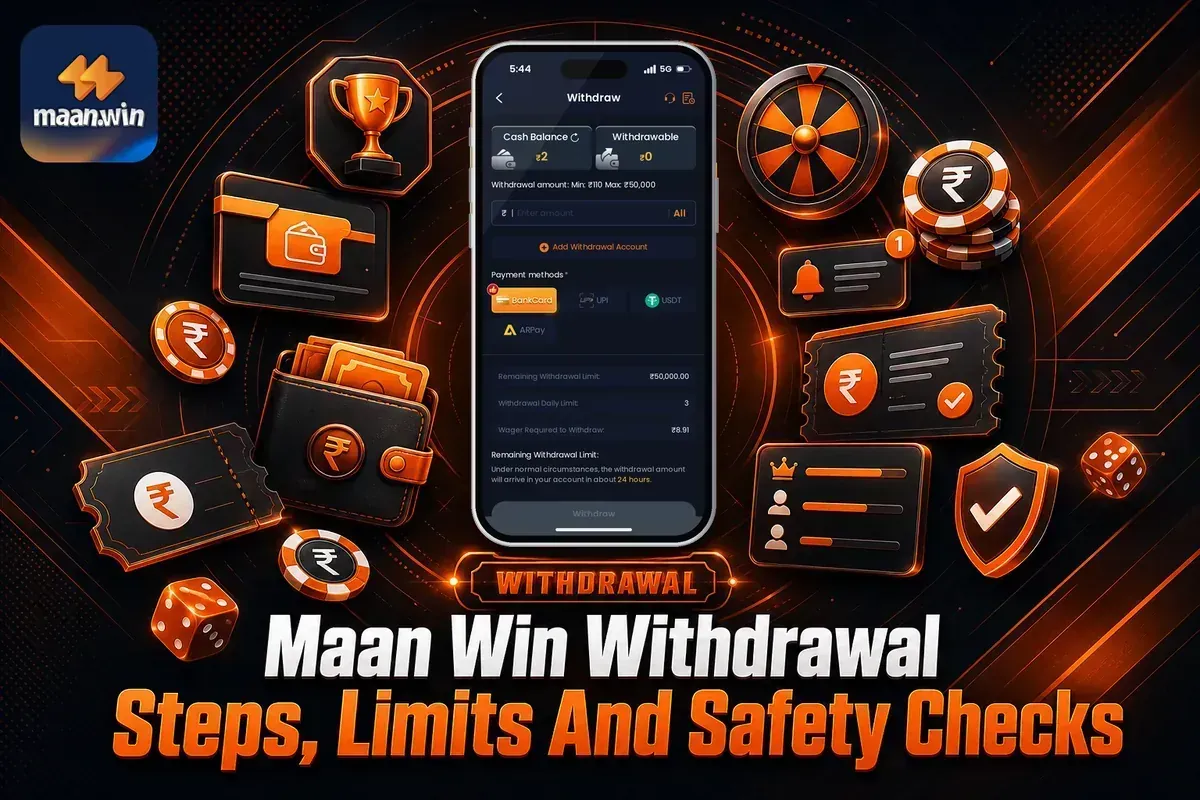
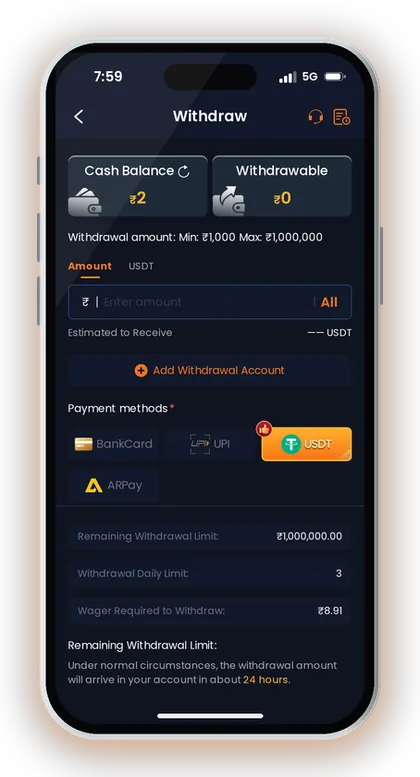
Maan Win withdrawal lets you move your withdrawable balance to BankCard, UPI, USDT or ARPay after you log in. The main withdrawal screen shows Cash Balance, Withdrawable, Add Withdrawal Account, payment methods, daily limit and wager required.
BankCard and UPI withdrawals start at ₹110 and go up to ₹50,000, while USDT starts at ₹1,000 and goes up to ₹1,000,000. ARPay starts at ₹100 and goes up to ₹50,000, but the AR wallet must be activated before use.
New players should not rush the first withdrawal. Check your Withdrawable amount, daily withdrawal limit, wager requirement and saved withdrawal account before you tap Withdraw.
- Payment Methods
- BankCard, UPI, USDT, ARPay
- Bank/UPI Min
- ₹110
- ARPay Min
- ₹100
- USDT Min
- ₹1,000
- Daily Limit
- 3 withdrawals
- Arrival Time
- About 24 hours
On This Page
How Maan Win Game Withdrawal Works
The Maan Win withdrawal page separates Cash Balance from Withdrawable balance. This matters because you can have money in the Wallet, but the app may still show a wager requirement before you can withdraw it.
The Wallet page says withdrawals are normally credited within 2 hours, but may take up to 24 hours. The withdrawal screen also says the amount will arrive in about 24 hours under normal circumstances.
The main mistake new players make is entering an amount from Cash Balance instead of checking Withdrawable. If the Withdrawable value is lower, reduce the amount or check the wager required line before trying again.
On Maan Win, the Maan Win Game Balance, Deposit and Withdraw buttons sit near the top, so you can reach the money section quickly after login. Keep the same mobile number and account access safe because withdrawal changes may need support review.
Good To Know: Use the Withdrawable balance, not only Cash Balance, when deciding how much to withdraw.
Before You Tap Withdraw
The withdrawal screen shows Wager Required to Withdraw along with remaining and daily withdrawal limits. Read these three lines before choosing BankCard, UPI, USDT or ARPay.
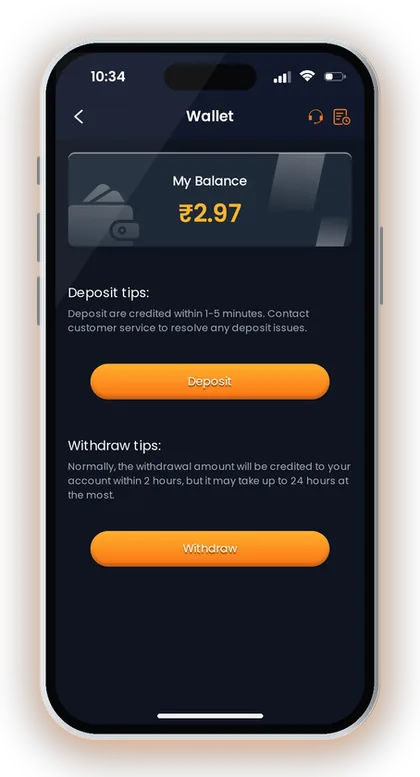
If you have just made a Maan Win deposit, wait until the balance is credited before sending a withdrawal request. A deposit that is still not credited can make your Wallet figures look confusing.
If you claimed a Maan Win bonus, check whether the app shows any wager required before withdrawal. Bonus money on real-money apps can often change when funds become withdrawable, so do not assume every rupee in Cash Balance is ready to withdraw.
If you are creating a new account before your first withdrawal, Register needs an Invite Code and you must enter PUWFKWN in that field. Do not leave the Invite Code blank, because registration is not possible without it.
- Cash Balance and Withdrawable are both visible.
- Wager Required to Withdraw is checked.
- Withdrawal account is added or updated.
- Daily withdrawal limit is still available.
- Method limit matches your amount.
Login And Account Access
The Login page uses +91, Remember password, Forgot Password, Login and Register Now. Use the Maan Win login page with the correct Indian mobile number before you open Wallet or Withdraw.
If you forgot the password, use Forgot Password instead of creating a second account. Multiple accounts can create account and withdrawal problems on real-money apps.
Withdrawal Account Check
The withdrawal page has Add Withdrawal Account before the method buttons. Add or check your BankCard, UPI, USDT or ARPay details before entering the amount.
Customer service has options to delete and rebind UPI, delete old USDT address and rebind, and delete withdraw bank account and rebind. Use these options if an old account is saved.
Good To Know: Do the first withdrawal with a smaller valid amount so you can confirm your saved method before using a larger amount.
Maan Win Withdraw Step By Step
The main Withdraw page shows Cash Balance, Withdrawable, withdrawal amount, All, Add Withdrawal Account and payment methods. This is the page where your Maan Win withdraw request is placed.
Do not use All without checking the method limit. If your Withdrawable balance is higher than the allowed maximum for that method, the request can fail or ask you to reduce the amount.
BankCard, UPI, USDT and ARPay are separate payment methods on the same withdrawal page. Select the method first, because each one has its own minimum, maximum and account setup.
- Login to your Maan Win account.
- Open Wallet or tap Withdraw from the main money area.
- Check Cash Balance, Withdrawable and Wager Required to Withdraw.
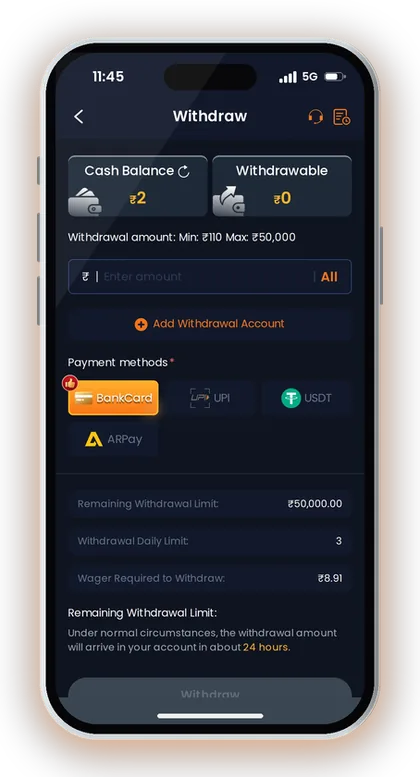
- Tap Add Withdrawal Account if no account is saved.
- Choose BankCard, UPI, USDT or ARPay.
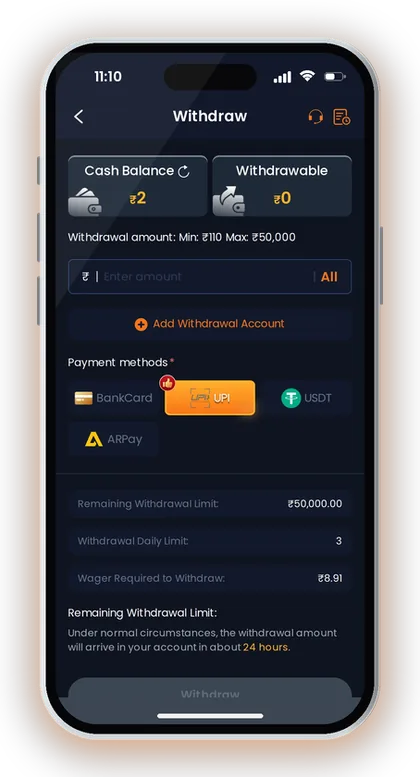
- Enter a withdrawal amount within that method’s limit.
- Check the daily withdrawal limit shown on the screen.
- Tap Withdraw and wait for the request to process.
Good To Know: Take a moment on the amount screen; most failed requests come from wrong method selection, wrong limit or an outdated withdrawal account.
Maan Win Withdrawal Limit By Method
The Maan Win withdrawal limit changes by payment method. BankCard and UPI have the same rupee range, USDT has a higher maximum, and ARPay has the lowest minimum.
Each method shows 3 withdrawals per day. If you split money into many small requests, you can use the daily count quickly and may have to wait for the next day.
USDT can handle a larger withdrawal range, but it needs a correct USDT withdrawal account. UPI and BankCard are easier for many Indian players because they use familiar payment details.
| Method | Minimum | Maximum | Daily Limit | Arrival |
|---|---|---|---|---|
| BankCard | ₹110 | ₹50,000 | 3 per day | About 24 hours |
| UPI | ₹110 | ₹50,000 | 3 per day | About 24 hours |
| USDT | ₹1,000 | ₹1,000,000 | 3 per day | About 24 hours |
| ARPay | ₹100 | ₹50,000 | 3 per day | About 24 hours |
Good To Know: Match the method to the amount; UPI suits smaller rupee withdrawals, while USDT is the method with the highest listed maximum.
BankCard And UPI Withdrawal On Maan Win
BankCard and UPI withdrawals both start at ₹110 and go up to ₹50,000. Each method shows 3 withdrawals per day and arrival in about 24 hours.
A Maan Win upi withdrawal is usually the first choice for players who already use UPI apps for deposits. It keeps the process in rupees and avoids USDT conversion checks.
BankCard can be useful when you prefer receiving money in a bank account instead of a UPI handle. Before withdrawing, check whether the saved account is the current one you use.
When UPI Makes Sense
The UPI withdrawal screen shows Cash Balance, Withdrawable, All, Add Withdrawal Account, payment methods and Withdrawal Daily Limit. Choose UPI only after your UPI account is added correctly.
If you changed your UPI ID, do not send a request to the old one. Use the customer service option to delete UPI and rebind when the saved detail is no longer valid.
When BankCard Makes Sense
BankCard uses the same ₹110 to ₹50,000 range as UPI. This is useful if you want money credited to a bank account and not through a UPI identifier.
If the bank name or IFSC detail needs correction, customer service has Change Bank Name and IFSC Modification. Fix these details before placing a new withdrawal request.
Good To Know: For the first UPI or BankCard withdrawal, use one valid request and wait for the result instead of sending repeated attempts.
USDT Withdrawal On Maan Win
USDT withdrawal starts at ₹1,000 and goes up to ₹1,000,000. The USDT screen shows Amount, USDT, Estimated to Receive and Add Withdrawal Account.
A Maan Win usdt withdrawal is different from UPI because you must check the receiving USDT details before submitting. If the saved USDT address is old, use the delete old USDT address and rebind option in customer service.
USDT is useful only when you already understand how your USDT wallet works. If you do not know which address is saved, do not test with a large amount.
The screen estimates how much USDT you will receive. Check that estimate before tapping Withdraw because the rupee amount and USDT amount are shown separately.
- Withdrawal amount is at least ₹1,000.
- Amount does not exceed ₹1,000,000.
- Saved USDT withdrawal account is current.
- Estimated to Receive is checked.
- Daily limit still shows availability.
Good To Know: Use USDT only when you are fully sure about the saved address, because wrong crypto details are harder to correct than a normal UPI mistake.
ARPay Withdrawal And Wallet Activation
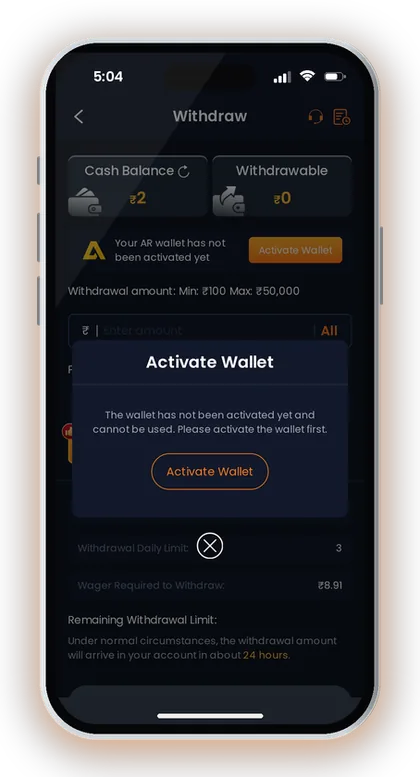
ARPay withdrawal starts at ₹100 and goes up to ₹50,000. The ARPay screen shows that the AR wallet has not been activated yet when activation is still pending.
You cannot use ARPay until you activate the wallet. The screen states that the wallet has not been activated yet and cannot be used, then shows Activate Wallet.
ARPay can be useful for players who already use that wallet, but it adds one extra setup step compared with UPI. If the wallet is not active, choose another available method or activate it first.
- Open Withdraw.
- Select ARPay.
- Check whether the AR wallet is active.
- Tap Activate Wallet if the screen asks for it.
- Return to Withdraw after activation.
- Enter an amount from ₹100 to ₹50,000.
- Tap Withdraw.
Good To Know: Do not select ARPay in a hurry; an inactive AR wallet blocks the request before withdrawal can move ahead.
Withdrawal Time, Pending Requests And Customer Care
The Wallet page says withdrawal money is normally credited within 2 hours, but it may take up to 24 hours. The withdrawal page also states that the amount will arrive in about 24 hours under normal circumstances.
If your request is still pending, do not keep changing methods or adding new accounts. Wait for the visible processing time and keep the amount, method and account details ready for support.
Maan Win customer service has a Self Service Center with Deposit Not Received, Withdrawal Problem, IFSC Modification, Delete UPI and Rebind, and Delete Old USDT Address and Rebind. Use Maan Win customer care when the request crosses the shown time or the saved account is wrong.
After submitting a support request, the Progress Query option shows the review result of the work order. This is better than sending the same issue again with different details.
If Withdrawal Is Delayed
A delayed withdrawal should be checked against the 24-hour maximum shown in the Wallet tips. If the time has not crossed that point, repeated requests can make tracking harder.
If the time has crossed 24 hours, submit Withdrawal Problem with the correct method and account details. Keep the request amount and withdrawal method ready.
If Details Are Wrong
Customer service includes IFSC Modification and Change Bank Name for bank-related issues. Use these before sending another BankCard request.
For UPI and USDT, use Delete UPI and Rebind or Delete Old USDT Address and Rebind. This prevents money from being sent to an old saved detail.
Good To Know: When you contact support, give one clear issue and one method name, because mixed UPI, BankCard and USDT details can slow the review.
Common Withdrawal Mistakes To Avoid
The most common withdrawal error is choosing an amount below the minimum or above the maximum. BankCard and UPI need ₹110 to ₹50,000, USDT needs ₹1,000 to ₹1,000,000, and ARPay needs ₹100 to ₹50,000.
Another mistake is ignoring Wager Required to Withdraw. If this value is not clear, check the withdrawal page before assuming that the full Cash Balance can be withdrawn.
Some players change UPI, bank or USDT details after placing a request. Update saved details first, then withdraw, because account changes during a pending request can create avoidable support work.
Real-money gaming carries risk, and game results can be random. Set a playing budget before you deposit, and do not use withdrawal money for another quick round just because it is still in the Wallet.
- Do not withdraw below the listed minimum.
- Do not exceed the method maximum.
- Do not ignore wager required.
- Do not use an old UPI or USDT account.
- Do not send repeated support tickets for the same request.
- Do not play with money kept aside for withdrawal.
Good To Know: Only players aged 18+ should use real-money games, and state rules on such games can differ across India.
Frequently Asked Questions
What is the minimum Maan Win withdrawal amount?
The minimum depends on the method. BankCard and UPI start at ₹110, USDT starts at ₹1,000, and ARPay starts at ₹100.
How long does Maan Win withdrawal take?
The Wallet page says withdrawal money is normally credited within 2 hours, but may take up to 24 hours. The withdrawal screen also says the amount arrives in about 24 hours under normal circumstances.
How many withdrawals can I make in one day?
BankCard, UPI, USDT and ARPay each show a daily limit of 3 withdrawals. Check the Remaining Withdrawal Limit on the withdrawal screen before placing another request.
Why is my Cash Balance higher than Withdrawable balance?
The withdrawal page shows Cash Balance and Withdrawable separately. If a Wager Required to Withdraw is shown, the full Cash Balance may not be ready for withdrawal.
Can I withdraw by UPI on Maan Win?
Yes, UPI is listed as a withdrawal method. UPI withdrawal starts at ₹110, goes up to ₹50,000, allows 3 withdrawals per day, and arrives in about 24 hours.
Can I withdraw by USDT on Maan Win?
Yes, USDT is listed as a withdrawal method. USDT withdrawal starts at ₹1,000 and goes up to ₹1,000,000, with 3 withdrawals per day and arrival in about 24 hours.
What should I do if my withdrawal account is wrong?
Use customer service before placing a new request. The Self Service Center has options to delete and rebind UPI, delete old USDT address and rebind, change bank name, and modify IFSC.
Do I need an invite code before using withdrawals?
You need a registered Maan Win account before you can withdraw. Registration requires an Invite Code, and you should enter PUWFKWN in that field.
Read Next
Maan Win deposit steps for India: UPI, USDT and ARPay limits, credit time, pending payment fixes and checks before you a

Maan Win customer care number help for India: use Live Support, Self Service Center, Progress Query, and fixes for depos

Use maan win login with +91, Remember password, Forgot Password, and safety checks. See what to do after Login and when

maan win bonus details for India: deposit offers, gift code, Deposit Wheel, tasks, Super Jackpot, and invite commission
Ready To Play On Maan Win?
Register on Maan Win in a minute and explore the games and offers.