
Maan Win WinGo Rules And Practical Play Tips
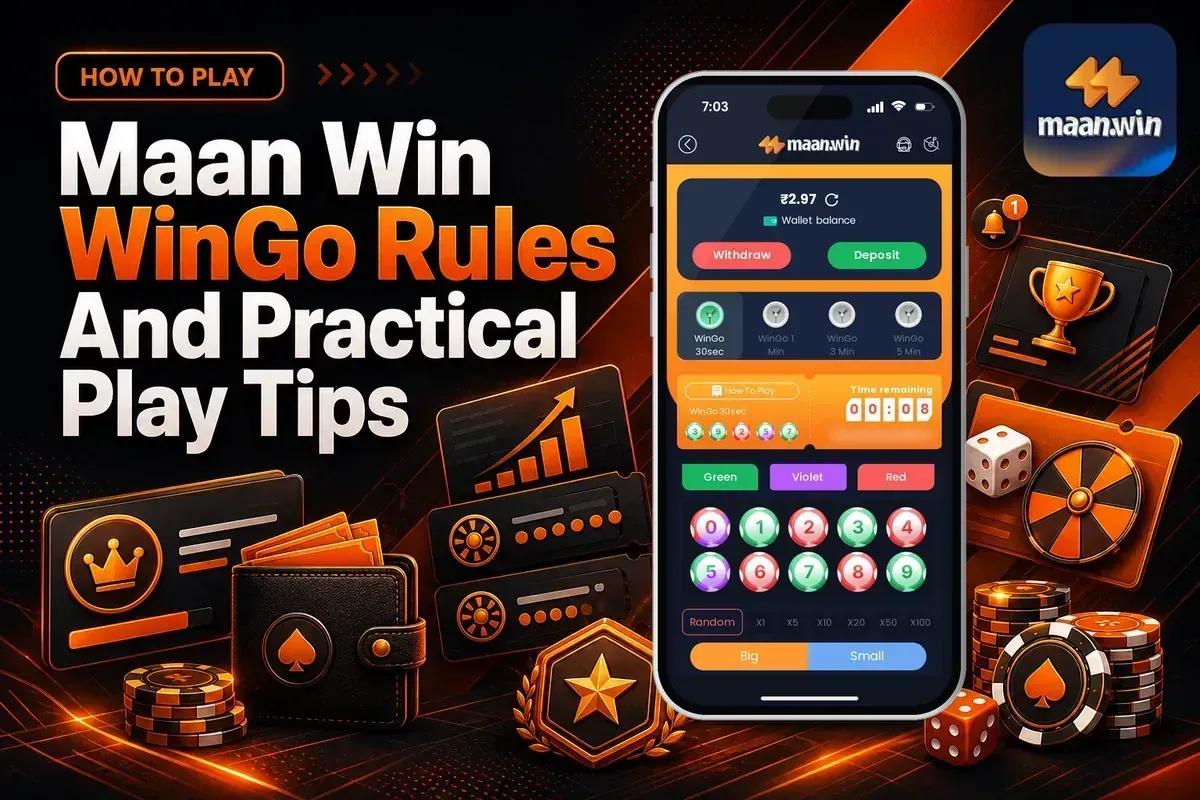
Maan Win WinGo is a lottery-style colour prediction game with 30sec, 1 Min, 3 Min and 5 Min rounds. You choose a round, place a bet on colour, number, big or small, and the result appears for that period.
The live WinGo screen shows Green, Violet, Red, Random, X10, X20, X50, X100, Big, Small, Game history, Chart and My history. These items matter because fast rounds can make new players place repeated bets without checking results.
If you are new to Maan Win, complete Maan Win register first and enter PUWFKWN in the Invite Code field. Registration needs an invite code, so keep PUWFKWN ready before you sign up.
- Game Type
- Lottery
- Fastest Round
- 30sec
- Slowest Round
- 5 Min
- Bet Choices
- Colour, number, big, small
- History
- Game, chart, my history
- Invite Code
- PUWFKWN
On This Page
What Is WinGo On Maan Win?
WinGo on Maan Win is listed under the Lottery category and also appears in popular game areas such as WinGo 30sec and WinGo 1 Min. The game is built around short periods where one result is shown after the timer ends.
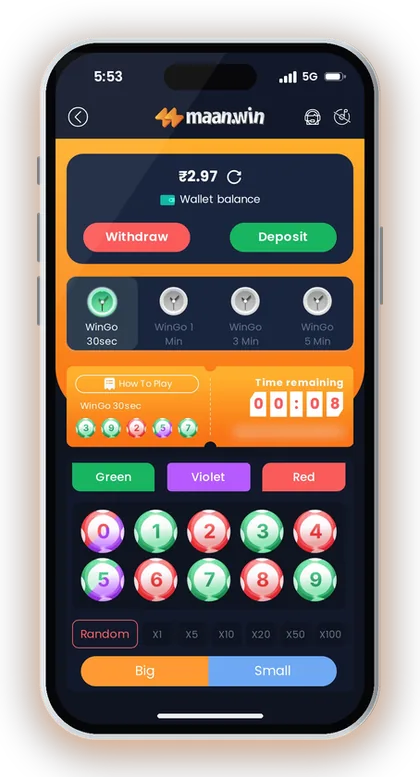
The main idea is simple: you pick a result type before the countdown finishes. You can choose a colour, a number-style option through Random, or a size option such as Big or Small.
This is why Maan Win colour prediction needs discipline. The result of each period is separate, and a long run of Red, Green, Big or Small does not make the next result fixed.
Why WinGo Feels Fast
The 30sec round is the quickest WinGo option shown on Maan Win. It gives you very little time to think, so repeated taps can happen if you chase the last result.
The 1 Min, 3 Min and 5 Min options give more time to check the chart and your own betting pattern. Many careful players start with a slower period because it reduces rushed choices.
Where It Fits With Other Lottery Games
Maan Win also lists other lottery titles like Maan Win K3 and Maan Win 5D. WinGo is easier to understand at first because the live screen clearly separates colour, Big and Small options.
K3 and 5D use different result styles, so do not carry one game's pattern thinking into another game. Treat each lottery game as a separate product with its own round format.
Good To Know: If you are learning the game, watch a few periods in Game history before placing your first bet.
Where To Find WinGo In The App
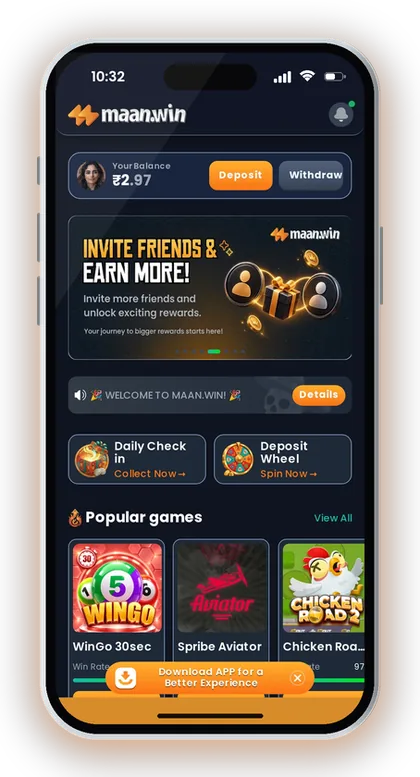
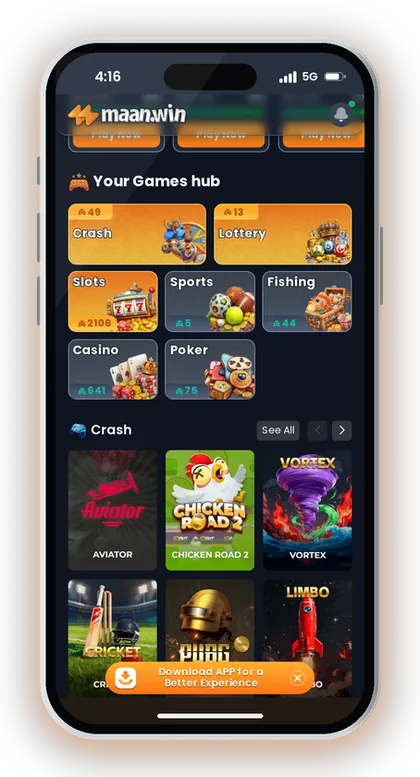
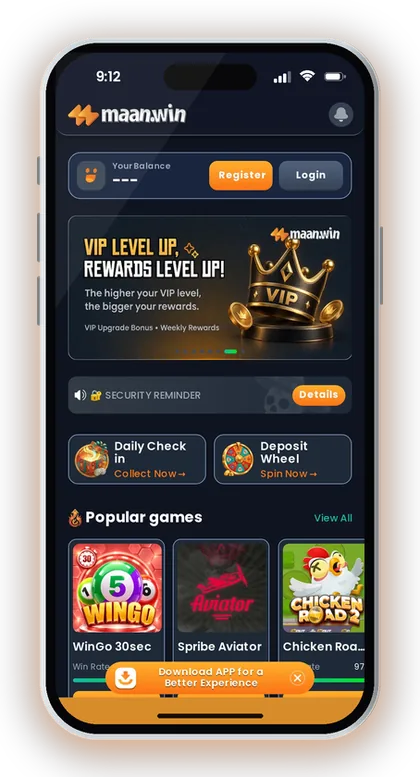
Maan Win shows WinGo 30sec on the homepage under Popular games, and the Games hub has a Lottery category. The Lottery page includes WinGo 3 Min and WinGo 5 Min, along with other lottery titles.
You can also use the wider Maan Win games area to compare Crash, Lottery, Slots, Sports, Fishing, Casino and Poker categories. For WinGo, stay inside Lottery so you do not mix it up with crash or slot games.
Before opening a fast round, check your Balance near the top of the app. A common mistake is entering the game straight after a deposit and betting before confirming that the Balance has updated.
- Open Maan Win and check your Balance.
- Tap Games or the Lottery category.
- Select WinGo 30sec, WinGo 1 Min, WinGo 3 Min or WinGo 5 Min.
- Check the timer before choosing any bet option.
- Review Game history or Chart before your first bet.
Homepage Route
The homepage shows Popular games and a Play Now button for WinGo 30sec. This is the quickest route if you already know you want the fastest WinGo round.
Fast access is useful, but it can also make you skip basic checks. Look at Balance first, then open the game.
Lottery Route
The Lottery category is better when you want to choose between WinGo 30sec, WinGo 1 Min, WinGo 3 Min and WinGo 5 Min. This route gives you more control over round speed.
New players often choose Maan Win wingo 30sec because it is visible and quick. A slower option is usually better for understanding periods, results and your own betting speed.
Good To Know: Use the Lottery route when you want to slow down and compare round lengths before playing.
WinGo Round Lengths On Maan Win
Maan Win shows four WinGo round options: 30sec, 1 Min, 3 Min and 5 Min. Each round has its own countdown and period number.
A period is the game round that receives one final result. You should place a bet only while time remains, because the result is locked after the countdown finishes.
The shorter the period, the easier it is to overplay. A player who places ten quick bets in 30sec rounds can lose control faster than a player who waits through 3 Min or 5 Min rounds.
| Round | Best For | Main Risk |
|---|---|---|
| WinGo 30sec | Fast play | Rushed repeat bets |
| WinGo 1 Min | Short waiting time | Chasing last result |
| WinGo 3 Min | More thinking time | Over-reading history |
| WinGo 5 Min | Slower decisions | Bigger bet temptation |
30sec And 1 Min Rounds
Maan Win WinGo 30sec is made for quick decisions, and Maan Win wingo 1 min gives slightly more time. Both are still fast enough to create pressure.
Use these rounds only after you understand the buttons and history area. If you are checking rules while the timer is running, you are already late.
3 Min And 5 Min Rounds
WinGo 3 Min and WinGo 5 Min give more time between results. This helps if you want to note the last few results before deciding.
Longer rounds do not improve your chance by themselves. Their main benefit is better control, fewer impulse bets and more time to stop.
Good To Know: If you often increase your bet after a loss, avoid 30sec rounds until you can stop after a fixed number of periods.
WinGo Bet Options And What They Mean
The live WinGo screen shows Green, Violet, Red, Random, X10, X20, X50, X100, Big and Small. These are the main controls you use before the round timer ends.
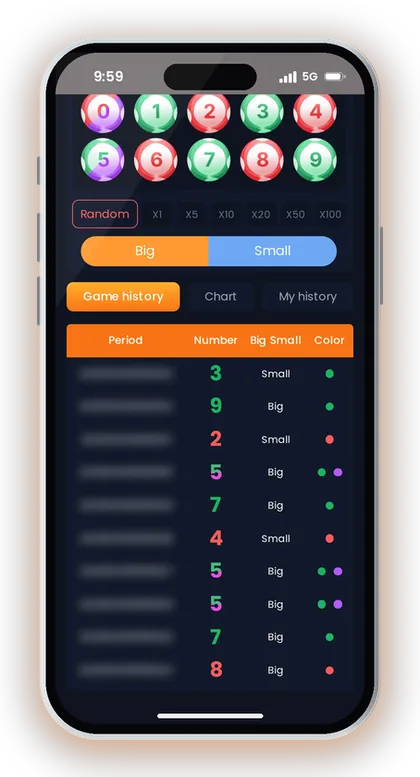
Colour bets are based on the colour result shown for that period. Big and Small are size choices, while Random is shown as a separate option on the game screen.
The X10, X20, X50 and X100 buttons are visible beside the bet area. Treat multiplier buttons carefully because a higher selection can raise your exposure quickly.
| On-Screen Option | How To Treat It |
|---|---|
| Green | Colour choice |
| Violet | Colour choice |
| Red | Colour choice |
| Random | Use only after checking rules |
| Big | Size choice |
| Small | Size choice |
| X10, X20, X50, X100 | Multiplier buttons |
Colour Choices
Green, Violet and Red are the visible colour choices in WinGo. Pick one only if you accept that the next period can still go any way.
New players often look at five or six past results and think a colour is due. Game history can show what happened, but it cannot confirm the next colour.
Big And Small Choices
Big and Small are shown as direct buttons on the WinGo screen. They are simpler than colour choices for many players because you are choosing a size category.
Simple does not mean safe. If you double your bet every time Big or Small misses, one bad run can damage your playing budget.
No Fixed Payout Table Shown Here
The WinGo live screen shows the bet buttons and result areas, but the visible game text does not list a full payout table. Check the bet confirmation and game rule area before placing money.
Do not assume that all choices pay the same. Colour, number-style and size choices can have different return structures in lottery games.
Good To Know: Before using any multiplier button, decide the maximum amount you are ready to lose in that session.
How A WinGo Period Works
Each WinGo period has a countdown timer, a period number and one final result. You place your choice before the timer ends, then check the result after the round closes.
Game history shows previous period results with Number, Big Small and Color columns. Chart gives a wider result view, while My history shows only your own activity.
Use these three areas differently. Game history is for checking public results, Chart is for spotting recent sequences, and My history is for checking whether you are betting too often.
- Choose the WinGo round length.
- Check the time remaining.
- Select Green, Violet, Red, Random, Big or Small.
- Confirm only if the period is still open.
- Wait for the result.
- Check Game history, Chart or My history.
Period Number
The period number helps you match your bet with the correct result. This matters when rounds are quick and two results appear close together.
If you are checking a dispute or your own record, note the period instead of saying only Red, Big or Small. A period number is more useful than memory.
History And Chart
Game history lists past results, including Number, Big Small and Color. This is useful for checking what actually happened after a round.
Chart can help you slow down, but it should not be treated as a result signal. Random games can show streaks, gaps and repeats without any fixed pattern.
Good To Know: If the timer is almost over, skip that period and wait for the next one instead of rushing a bet.
How To Start Playing WinGo After Registration
Maan Win login uses a +91 mobile number screen with Remember password, Forgot Password, Login and Register Now. If you are not registered, use the Register path and enter PUWFKWN in the Invite Code field.
After Login, add money only from the platform Deposit page. If you need details before funding your account, read the Maan Win deposit page and check the current method shown in the app.
Say you deposit and the Balance does not update immediately. Do not place any WinGo bet until the Balance is visible, because the Wallet page says deposits are credited within 1-5 minutes and deposit issues should go to customer service.
- Tap Register Now if you do not have an account.
- Enter your mobile number and required account details.
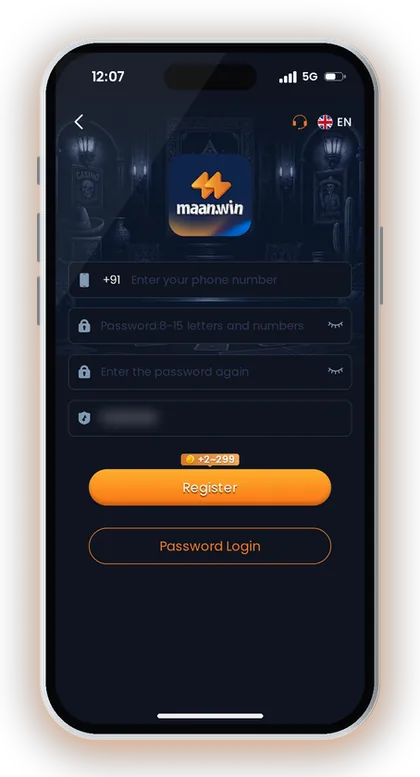
- Enter PUWFKWN in the Invite Code field.
- Finish registration and use Login.
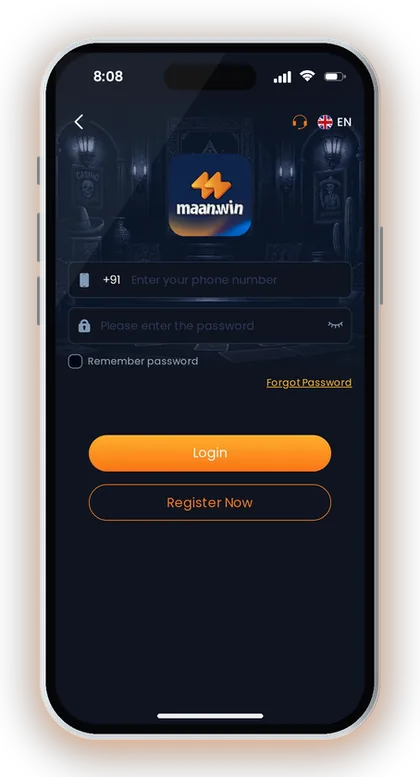
- Deposit from the Deposit page only.
- Open WinGo from Popular games or Lottery.
Before Your First Bet
Check your Balance, choose a round length and decide your playing budget first. This order matters because WinGo rounds can restart quickly and tempt you to add more.
Also check whether you can access Withdraw and Add Withdrawal Account from the Wallet area. Experienced players always confirm withdrawal setup before long play sessions.
Good To Know: Do not save old QR codes or reuse old payment details; return to the Maan Win Deposit page for each new payment.
Practical Playing Budget Tips For WinGo
WinGo results should be treated as random from a player point of view. Your safest control is not prediction, but bet size, round choice and stop limits.
Set one session budget before opening the game. If you choose ₹500 as your limit, split it into smaller parts and stop when the limit is used instead of moving to a bigger multiplier.
A common mistake is chasing one colour after it repeats or misses. Another mistake is moving from 5 Min to 30sec after a loss because you want a quick recovery.
- Fix a session budget before opening WinGo.
- Choose one round length and stay with it.
- Avoid increasing after a loss.
- Skip rounds when you feel rushed.
- Stop after your planned loss or win limit.
Use Slower Rounds For Control
The 3 Min and 5 Min rounds give you time to breathe between results. That delay helps you avoid back-to-back bets made in anger.
Fast rounds are not wrong, but they need strict limits. If you cannot skip a 30sec period, choose 3 Min or 5 Min instead.
Avoid Multiplier Escalation
X10, X20, X50 and X100 are visible on the WinGo screen, so they can look tempting after a few small wins. Higher selections can also increase losses quickly.
Use a fixed bet size for a few periods before changing anything. If the result goes against you, pause instead of jumping to a higher button.
Check My History
My history is useful because it shows your own game record instead of general results. It helps you see whether you are placing too many bets in one session.
If your My history has many quick entries, take a break. The number of bets you place is one of the few things you fully control.
Good To Know: Play only with money kept aside for entertainment, and do not use rent, loan, school fee or family money.
WinGo Vs Other Maan Win Game Types
WinGo is a Lottery game, while Maan Win also lists Crash, Slots, Sports, Fishing, Casino and Poker. Each category has a different speed, decision style and risk pattern.
Crash games such as Aviator-style games usually involve leaving before a multiplier falls, while WinGo asks you to choose a result before the period ends. Slots are different again because each spin has its own game design.
This difference matters when you plan your session. A player who likes slow checking may prefer WinGo 5 Min, while someone who wants action may move to Crash, but faster action also increases decision pressure.
| Game Type | Main Decision | What To Watch |
|---|---|---|
| WinGo | Pick result type | Period timer |
| Crash | Exit timing | Multiplier movement |
| Slots | Spin choice | Game rules |
| Poker | Card decision | Table rules |
WinGo And Crash Games
WinGo has fixed periods such as 30sec, 1 Min, 3 Min and 5 Min. Crash games usually move with a rising multiplier and a sudden stop.
Do not use the same plan for both. In WinGo, the key check is the period timer; in crash games, the key risk is waiting too long.
WinGo And Slots
Slots such as Fortune Gems 2, Money Coming and Super Ace are listed on Maan Win. They do not use the same period structure as WinGo.
If you switch from slots to Maan Win go, slow down and check the timer first. WinGo decisions must be made before the countdown ends.
Good To Know: Switching games after losses usually leads to worse decisions, so end the session before changing category in anger.
Responsible Play And Support For WinGo
Maan Win has Customer Care options for Game Problems, Deposit Not Received, Withdrawal Problem, Login Problem and related account issues. Use the correct option so your request goes to the right support queue.
If a WinGo result, period or Balance entry looks wrong, check Game history and My history first. Then submit the issue under Game Problems with the period detail.
Real-money games carry financial risk, and rules on real-money gaming differ by state in India. Play only if you are 18+ and allowed to take part where you live.
- Use Game history for public results.
- Use My history for your own bets.
- Use Game Problems for unclear game issues.
- Use Progress Query after submitting support.
- Stop when play affects money or time.
When To Contact Customer Care
Contact Customer Care if a game issue is not clear from Game history or My history. For payment issues, use Deposit Not Received or Withdrawal Problem instead of Game Problems.
After submitting a request, the support area has Progress Query to view the review result. Keep your period number, amount and account details ready before raising the ticket.
When To Stop
Stop if you are increasing bet size to recover a loss. That is the clearest sign that the session is no longer controlled.
Also stop if you are hiding play from family, borrowing money or playing during work or study time. WinGo should stay entertainment, not a way to solve money pressure.
Good To Know: Take a break after any session where you feel pressure to recover money quickly.
Frequently Asked Questions
What is Maan Win WinGo?
Maan Win WinGo is a Lottery game with period-based results. You can choose options such as Green, Violet, Red, Random, Big and Small before the countdown ends.
Which WinGo rounds are available on Maan Win?
Maan Win shows WinGo 30sec, WinGo 1 Min, WinGo 3 Min and WinGo 5 Min. The 30sec round is the fastest, while 5 Min gives more time to decide.
Where can I find WinGo in Maan Win?
WinGo 30sec appears in Popular games on the homepage. You can also open the Lottery category to find WinGo round options.
Does WinGo show history?
Yes, the live WinGo screen shows Game history, Chart and My history. Game history lists Period, Number, Big Small and Color, while My history is for your own records.
Is 30sec better than 5 Min in WinGo?
30sec is faster, but it can lead to rushed bets. 5 Min is slower and gives more thinking time, which is usually better for players who are still learning.
Can I predict the next WinGo colour?
No result should be treated as fixed in advance. History can show past Green, Violet, Red, Big or Small results, but it cannot confirm the next period.
Do I need an invite code to register before playing WinGo?
Yes, registration on Maan Win needs an Invite Code. Enter PUWFKWN in the Invite Code field when you sign up.
What should I do if my WinGo result looks wrong?
Check the period in Game history and your entry in My history first. If it still looks wrong, use Customer Care and choose Game Problems, then track it through Progress Query.
Read Next
Maan Win K3 lottery page for India: find K3 1 Min, 3 Min, 5 Min and 10 Min, learn round basics, bet checks, budget tips
Maan Win 5D covers 1 Min, 3 Min and 5 Min lottery rounds, period results, safe bet selection, history checks and cautiou
Maan Win deposit steps for India: UPI, USDT and ARPay limits, credit time, pending payment fixes and checks before you a
Maan Win register steps for India: use invite code PUWFKWN, check +91 mobile details, fix common errors, and know what t
Ready To Play On Maan Win?
Register on Maan Win in a minute and explore the games and offers.