
Maan Win Deposit Not Received: What To Check First
Maan Win deposit not received usually means your payment has not reached Balance within the normal 1-5 minute credit time. The first check is simple: return to the Maan Win deposit page and see whether Cash Balance or Withdrawable has changed.
If the payment is successful but the Wallet still does not update after 30 minutes, Maan Win asks you to contact customer service. Do not send the same payment again using an old QR or saved UPI account, because that is a common reason for a delayed or missing credit.
For a new account, registration needs an Invite Code, so enter PUWFKWN in the Invite Code field before you deposit. Use the same Login account for payment checks, because a deposit made on one account will not appear in another account.
- Normal Credit
- 1-5 minutes
- Contact After
- 30 minutes
- UPI Deposit
- ₹100-₹50,000
- USDT Deposit
- 10-100000 USDT
- ARPay Deposit
- ₹100-₹50,000
- Support Route
- Self Service Center
On This Page
Normal Maan Win Game Deposit Timing
Maan Win Game deposits are credited within 1-5 minutes under normal conditions. That timing matters because many players panic after 30 seconds, refresh many times, and then make a second payment before the first one has settled.
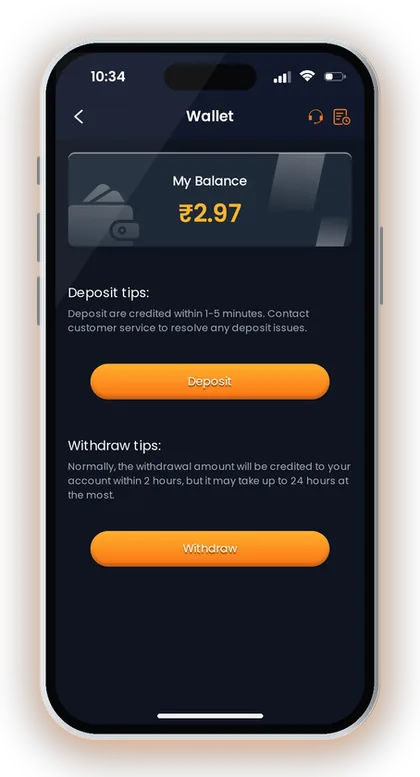
The Wallet page says deposits are credited within 1-5 minutes and deposit issues should be taken to customer service. The Deposit page also says that after successful payment, you should return to the Maan Win deposit page to check your account balance.
If you paid ₹500 by UPI and the Balance does not change in one minute, wait and check again from the Deposit or Wallet area. If the same payment is still missing after 30 minutes, treat it as a Maan Win deposit not received case and prepare your payment proof.
Good To Know: Do not judge a deposit as failed until the 1-5 minute normal credit window has passed.
Check The Payment Amount Before Anything Else
Maan Win deposit amounts on UPI and ARPay start at ₹100 and go up to ₹50,000. If you enter an amount outside the allowed range, the payment can create a problem before it reaches your Balance.
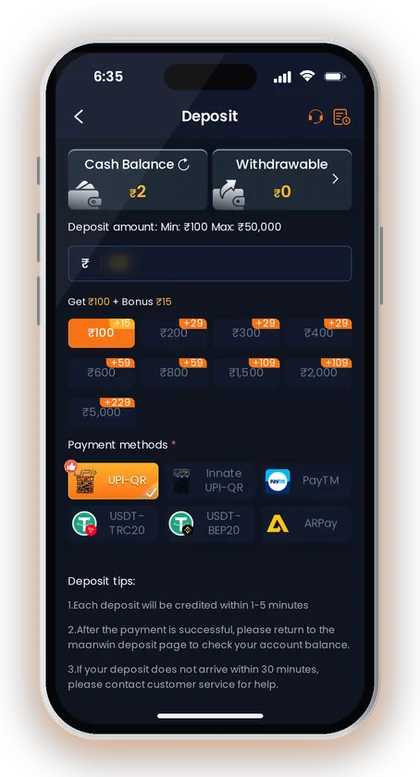
The Deposit page warns you not to modify the payment amount. This is important because payment matching often depends on the exact amount created on the deposit page, not the amount you later type manually in your UPI app.
Say the Deposit page creates ₹500 and you change it to ₹501 in PhonePe or Paytm. The payment may leave your bank, but the Maan Win Wallet may not match it quickly, so the Maan Win payment not credited issue becomes harder to trace.
UPI Amount Check
UPI deposits on Maan Win use the ₹100 to ₹50,000 range. Use the amount generated on the current Deposit page and finish the payment from the current QR or UPI request only.
Avoid using an old screenshot of a QR code. The Deposit page clearly says not to reuse saved QR codes or UPI accounts for multiple payments.
USDT Amount Check
USDT deposits show a minimum of 10 and a maximum of 100000 on the deposit method page. If you use USDT, check the selected network and the current deposit screen before sending.
USDT mistakes are usually harder to fix than UPI mistakes because network and address details must match. If you are unsure, use a small valid amount first and keep the transaction record ready.
Good To Know: Match the exact amount shown on Maan Win; do not round it, increase it, or split it into two payments.
What To Do In The First 5 Minutes
Maan Win says each deposit will be credited within 1-5 minutes. The right action during this time is to check Balance calmly, not to keep creating fresh deposit orders.
Use the same Maan Win Login account that created the deposit. A common mistake is paying after opening one account and then checking another account on the same phone browser.
If you are creating a new account before depositing, Maan Win registration needs an Invite Code, so enter PUWFKWN in the Invite Code field. After that, use the same mobile number and Login each time you check your Wallet.
- Return to the Maan Win Deposit page after payment.
- Check Cash Balance and Withdrawable Balance.
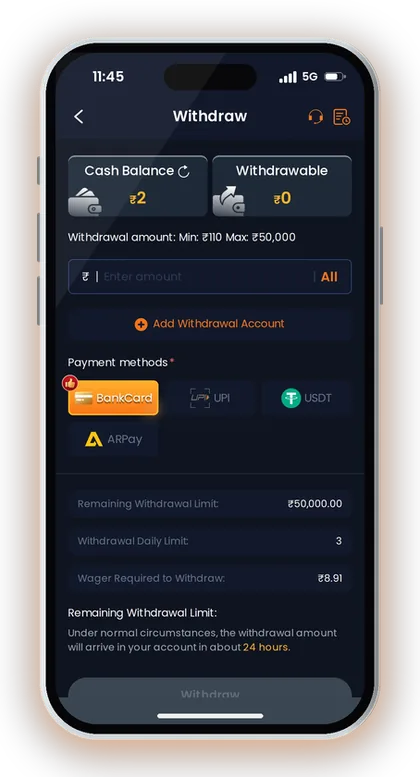
- Open Wallet and check My Balance.
- Wait until 5 minutes have passed.
- Do not reuse the same QR for another payment.
Good To Know: Keep your bank or UPI success screen open until the Balance updates.
Checks Between 5 And 30 Minutes
Maan Win asks you to contact customer service if your deposit does not arrive within 30 minutes. Between 5 and 30 minutes, check the payment proof, account, method, and amount so your support request is clean.
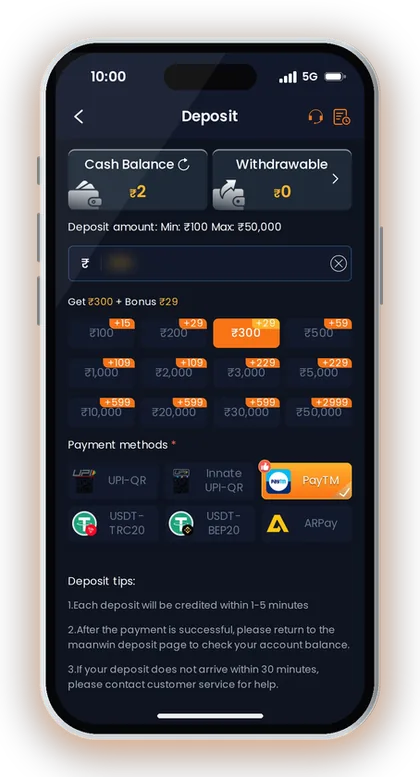
Open the Maan Win deposit page and compare your deposit method with the payment you actually used. UPI, USDT, and ARPay are different routes, so the wrong route can delay matching.
This is also the time to check whether your bank shows the payment as successful or processing. A bank-side delay is not the same as a Maan Win deposit pending case, because the platform can credit only after the payment is actually successful.
- The paid amount matches the Maan Win deposit order.
- The payment status in your UPI app or wallet is successful.
- You did not use an old QR code or saved UPI account.
- You are checking the same Login account.
- You have a screenshot or transaction ID ready.
Good To Know: If your bank app says processing, wait for the bank result before raising a deposit complaint.
When To Contact Maan Win Customer Care
Maan Win says if your deposit does not arrive within 30 minutes, you should contact customer service for help. Do not wait for hours if the payment is successful and the Balance still has not changed.
Use the Self Service Center and select Deposit Not Received. The support page also has FAQ, Deposit and Withdraw Problem, Game Problems, and Progress Query for checking the result of your work order.
For a clean request, give the exact payment amount, payment method, transaction reference, time of payment, and your Maan Win account details. A short, clear complaint is easier to handle than many repeated messages with missing details.
If you need the support route, use Maan Win customer care and choose the matching issue. For other payment topics and safety notes, the Maan Win blog keeps related help in one place.
- Open Customer Care or Live Support.
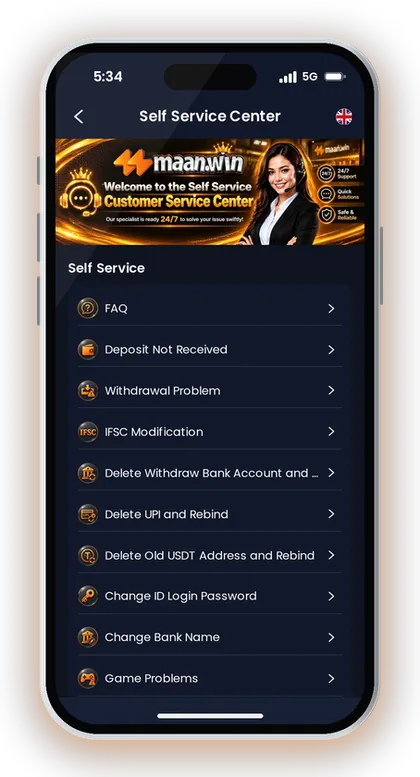
- Select Deposit Not Received.
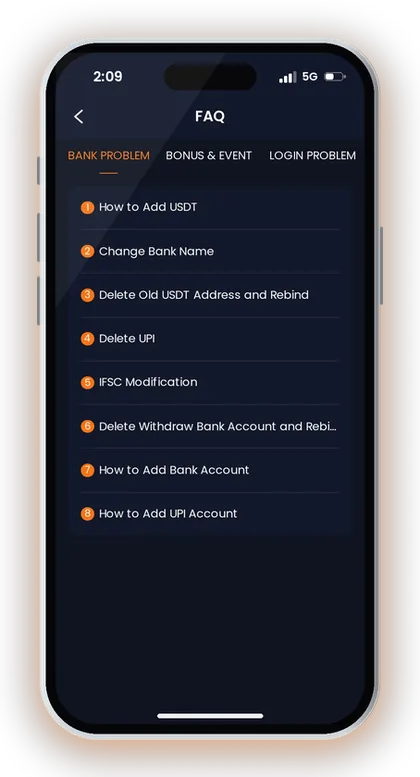
- Submit the payment proof and amount.
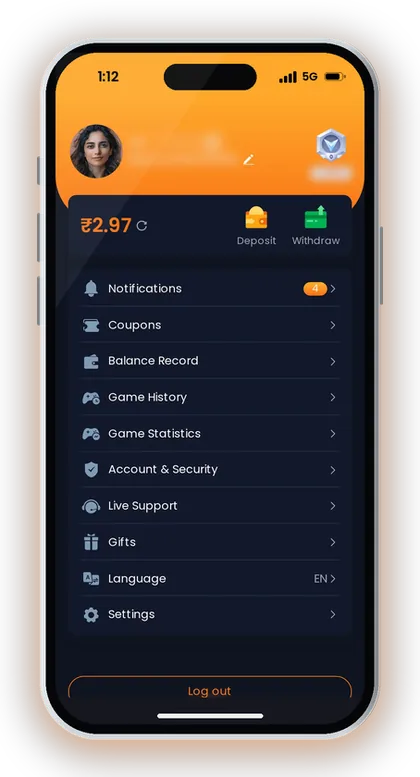
- Wait for the customer service review.
- Use Progress Query to check the result.
Good To Know: Raise one proper work order instead of sending many incomplete complaints.
Common Reasons A Deposit Does Not Show
Maan Win specifically warns players not to modify the payment amount and not to reuse saved QR codes or UPI accounts. These two mistakes create many deposit delays because the payment no longer matches the fresh deposit order.
A second mistake is checking the wrong account after payment. If you used one mobile number to Login and another number later, the Balance check will mislead you.
A third mistake is using an unsafe or old entry point to open the site. Use the Maan Win official channel route when you need current access details, and avoid paying from random shared screenshots.
Changed Amount
The payment amount should stay exactly as shown on the Maan Win Deposit page. Even a small change can make the credit slower because the system has to identify the payment manually.
If you changed the amount by mistake, do not repeat the deposit immediately. Save the proof and contact support after the 30-minute mark if the Balance is still unchanged.
Old QR Or Saved UPI
Maan Win says to avoid reusing saved QR codes or UPI accounts for multiple payments. A QR created for one deposit should not be treated like a permanent payment address.
Create a fresh Deposit order each time. This gives the payment a better chance of matching your account and amount quickly.
Wrong Account Check
The Balance belongs to the Login account that created the deposit. If your family member also uses the same phone, confirm the mobile number before checking Wallet.
For a new signup, enter PUWFKWN in the Invite Code field because Maan Win registration needs an invite code. Then keep your Login details safe before making any payment.
Good To Know: Fresh deposit order, exact amount, same account: these three checks prevent most avoidable deposit complaints.
UPI, USDT And ARPay Deposit Checks
Maan Win supports UPI, USDT, and ARPay for deposits. Each method has its own checks, so do not troubleshoot a USDT issue like a UPI issue.
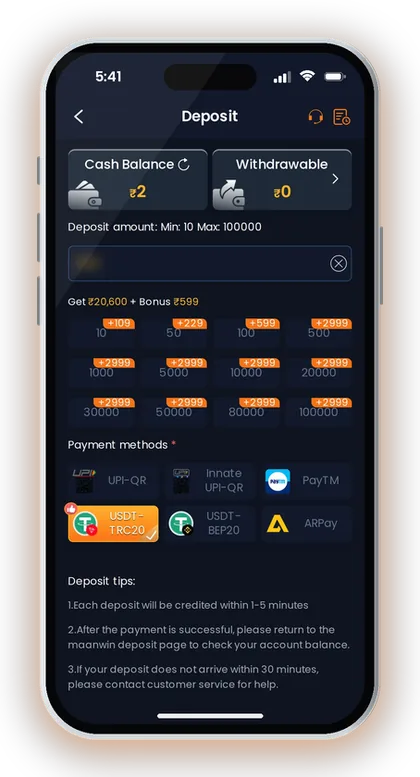
UPI is usually simpler for Indian players because the bank app gives an instant success or failure result. USDT needs extra care because network and amount details must match the selected deposit method.
ARPay may ask you to activate the wallet before use. If ARPay is not active, finish activation first instead of forcing a deposit from another screen.
| Method | Deposit Range | Best Check |
|---|---|---|
| UPI | ₹100-₹50,000 | Exact amount and fresh QR |
| USDT | 10-100000 USDT | Network and transaction record |
| ARPay | ₹100-₹50,000 | Wallet activation |
Good To Know: Use UPI if you want a simpler bank proof trail; use USDT only when you understand the network details.
If The Balance Updates Late
Maan Win credits deposits to your Balance, and the Wallet also shows My Balance. If the amount appears late, check the Balance Record before playing, because it confirms whether the credit was added to the account.
Do not start high-value rounds immediately after a delayed credit if you are already stressed. Colour, lottery, crash, casino, slots, poker, fishing, and sports games can move fast, and rushed play usually leads to poor decisions.
If a deposit appears after you have already submitted a work order, do not submit the same issue again. Use Progress Query only to track the existing request, because duplicate complaints can slow down the review.
Before Playing After A Delay
Check the credited amount first and confirm it matches your payment. If you paid ₹1,000, your Balance check should make sense before you enter WinGo, Aviator, Mines, slots, or casino games.
Keep your playing budget separate from the deposit issue. A late credit does not mean you should increase your next round amount to recover time.
If It Still Does Not Arrive
If the payment is successful and the deposit is still missing after the 30-minute support point, continue through Customer Care. Keep the same proof ready and avoid sending new payments to test the account.
For withdrawal delays, use Maan Win withdrawal pending help because withdrawal timing and limits are different from deposit timing. Mixing both issues in one support request can make the case unclear.
Good To Know: A late credit should be checked in Balance Record before you use it in any game.
Safer Habits Before Your Next Deposit
Maan Win deposits work best when you create a fresh Deposit order and pay the exact amount shown. This one habit prevents most avoidable Maan Win deposit problem cases.
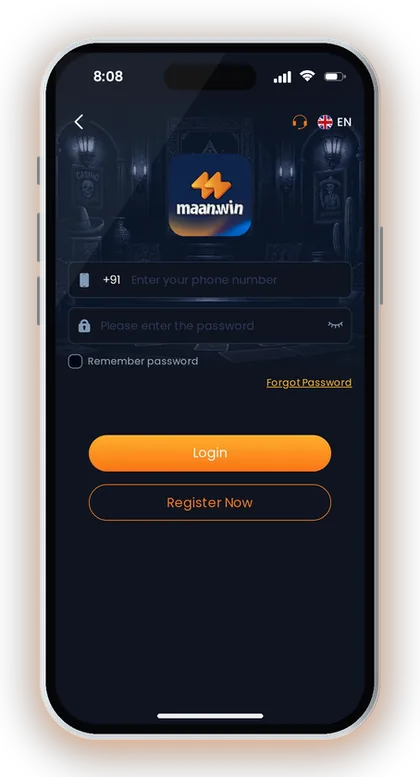
Before depositing again, confirm your account security, Login number, and payment method. If you also need to manage withdrawal details, read Maan Win add UPI account steps because bank and UPI binding affects withdrawals, not deposit credit.
Set a clear playing budget before you press Pay now. Real-money games involve risk, and a deposit that arrives correctly can still be lost quickly in fast rounds like WinGo 30sec, crash games, slots, or casino tables.
If your last deposit had a delay, make the next one only after the old issue is closed or the Balance has updated. Sending repeated payments during confusion makes tracking harder for you and support.
- Use the current Deposit page only.
- Pay the exact shown amount.
- Keep payment proof until Balance updates.
- Wait 30 minutes before support escalation.
- Play only with money you can afford to lose.
Good To Know: Players in India should also check their state rules before using any real-money gaming platform.
Frequently Asked Questions
How long does a Maan Win deposit take to show in Balance?
Maan Win says deposits are credited within 1-5 minutes. After payment, return to the Deposit page and check your account balance. If it does not arrive within 30 minutes, contact customer service.
What should I do if my Maan Win payment is successful but not credited?
First check that the amount, method, and Login account are correct. Do not reuse the same QR or make another payment immediately. If the Balance is still unchanged after 30 minutes, submit a Deposit Not Received request with payment proof.
Can I change the deposit amount in my UPI app?
No, you should not modify the payment amount. Maan Win warns players not to change the amount because the payment may not match the deposit order. Always pay the exact amount shown on the current Deposit page.
Is it safe to use an old QR code for another Maan Win deposit?
No, Maan Win says you should avoid reusing saved QR codes or UPI accounts for multiple payments. Create a fresh Deposit order every time. This helps the system match your payment to your account.
Where do I complain about a Maan Win deposit not received issue?
Open Customer Care or Live Support and select Deposit Not Received in the Self Service Center. Submit the correct payment amount, method, transaction proof, and time. After submission, use Progress Query to check the review result.
What is the minimum Maan Win deposit amount?
UPI deposits start at ₹100 and go up to ₹50,000. ARPay also shows ₹100 to ₹50,000. USDT shows 10 to 100000 on the deposit method page.
Do I need an Invite Code before depositing on a new account?
Yes, Maan Win registration needs an Invite Code. Enter PUWFKWN in the Invite Code field when creating the account. After that, use the same Login account for your Deposit and Balance checks.
Read Next
Maan Win deposit steps for India: UPI, USDT and ARPay limits, credit time, pending payment fixes and checks before you a

Maan Win customer care number help for India: use Live Support, Self Service Center, Progress Query, and fixes for depos
Use the maan win official link to Register with invite code **PUWFKWN**, Login with +91, open the app, find games, and r
maan win withdrawal pending? Check normal timing, BankCard, UPI, USDT and ARPay limits, daily withdrawal rules, and supp
Ready To Play On Maan Win?
Register on Maan Win in a minute and explore the games and offers.