
Maan Win Withdrawal Pending: Timing, Limits And Fixes
Maan Win withdrawal pending means your withdrawal request is still being checked or processed before the money reaches your bank, UPI, USDT wallet or ARPay wallet. Maan Win shows withdrawals arriving in about 24 hours, while the Wallet page says withdrawals normally credit within 2 hours but can take up to 24 hours.
The first thing to check is the method you used, because BankCard, UPI, USDT and ARPay have different minimum and maximum limits. You should also check whether your Withdrawable balance is enough and whether the required bet amount shown on the Withdraw page is cleared.
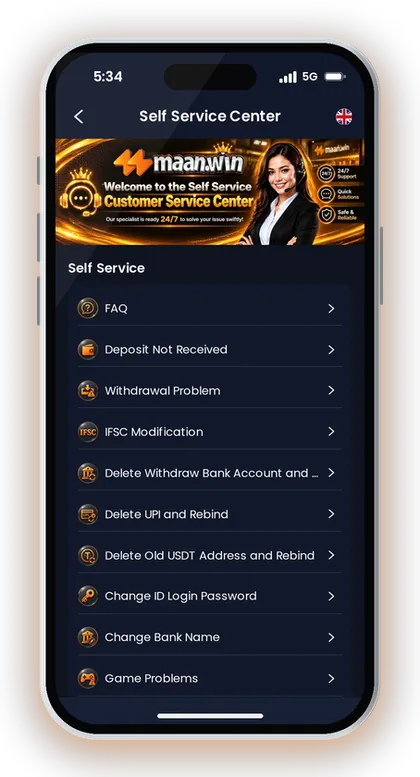
If the money has not arrived after the normal time, use the Self Service Center and choose the matching withdrawal issue. Keep your amount, method and account details ready so Customer Care can review the request faster.
- Withdrawal Time
- About 24 hours
- Daily Limit
- 3 per day
- Bank/UPI Limit
- ₹110 to ₹50,000
- USDT Limit
- ₹1,000 to ₹1,000,000
- ARPay Limit
- ₹100 to ₹50,000
- Support Route
- Self Service Center
On This Page
Maan Win Game Withdrawal Time: What Is Normal?
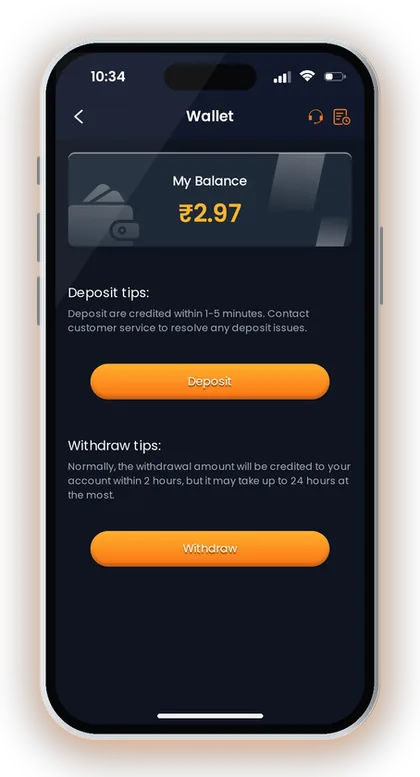
Maan Win shows that withdrawals arrive in about 24 hours, and the Wallet page says the amount normally credits within 2 hours but may take up to 24 hours. For you, this means a pending status is not always a Maan Win withdrawal problem in the first few hours.
A new player often checks the bank app every few minutes and raises multiple tickets too early. That can create confusion if the same withdrawal is being reviewed while support receives repeat requests for the same amount.
Treat the first 24 hours as the normal checking window unless the app shows a clear failed status. During this time, do not delete your bank, UPI, USDT or ARPay details unless Customer Care asks you to correct them.
Why 2 Hours And 24 Hours Both Matter
The Wallet page gives a faster normal credit window of 2 hours, while the Withdraw page gives about 24 hours under normal circumstances. A practical way to read this is simple: many withdrawals may finish earlier, but you should allow up to 24 hours before treating it as delayed.
Say you withdraw by UPI at night and the amount is still pending after 90 minutes. That is still inside the normal window, so check the Withdraw page status and your UPI app before raising a ticket.
When Pending Becomes Delayed
A withdrawal becomes delayed when the amount has not reached your selected account after the 24-hour window. At that point, you should use the withdrawal support option instead of making a fresh withdrawal for the same balance.
If the app shows a required bet amount or a non-withdrawable balance, the request may not move ahead until that condition is cleared. Check the displayed values on the Withdraw page before assuming a payment failure.
Good To Know: Tip: Take one screenshot of the pending withdrawal details before contacting support, because it helps you explain the exact amount and method.
Withdrawal Limits By Method
Maan Win shows four withdrawal methods: BankCard, UPI, USDT and ARPay. Each method has its own minimum amount, maximum amount and daily limit, so the correct method depends on your balance size and account setup.
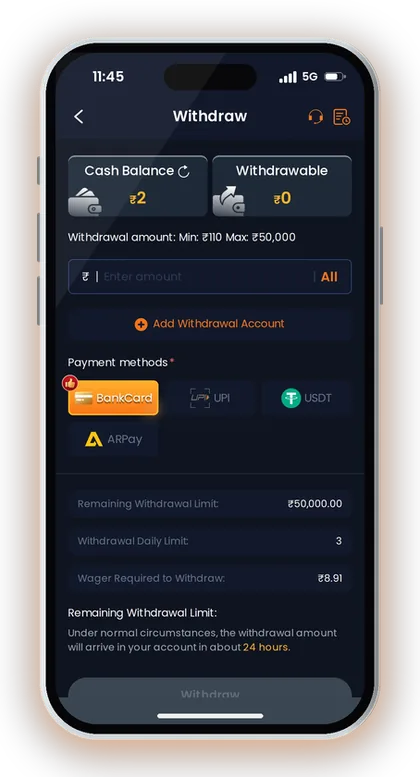
BankCard and UPI both start at ₹110 and go up to ₹50,000. USDT starts at ₹1,000 and goes up to ₹1,000,000, while ARPay starts at ₹100 and goes up to ₹50,000.
Each withdrawal method shows 3 withdrawals per day. If you hit the daily limit, wait for the next day instead of changing account details repeatedly.
For the full method page, check the Maan Win withdrawal limit details before you submit a request. Limits can decide whether your withdrawal goes through or stays blocked at the form level.
| Method | Minimum | Maximum | Arrival | Daily Limit |
|---|---|---|---|---|
| BankCard | ₹110 | ₹50,000 | About 24 hours | 3 per day |
| UPI | ₹110 | ₹50,000 | About 24 hours | 3 per day |
| USDT | ₹1,000 | ₹1,000,000 | About 24 hours | 3 per day |
| ARPay | ₹100 | ₹50,000 | About 24 hours | 3 per day |
Good To Know: Tip: Use BankCard or UPI for regular rupee withdrawals, and use USDT only if your USDT address and network details are already correct.
Why A Withdrawal Stays Pending
Maan Win shows Cash Balance, Withdrawable amount, Remaining Withdrawal Limit, Withdrawal Daily Limit and required bet amount on the Withdraw page. A pending request is usually linked to one of these values or to the payment account added for the selected method.
The most common mistake is reading Cash Balance as money that can be withdrawn immediately. You should check the Withdrawable value, because the app separates total cash from money allowed for withdrawal.
Another common issue is changing the withdrawal method without checking the minimum amount. For example, ₹500 may meet UPI and BankCard minimums, but it does not meet the USDT minimum of ₹1,000.
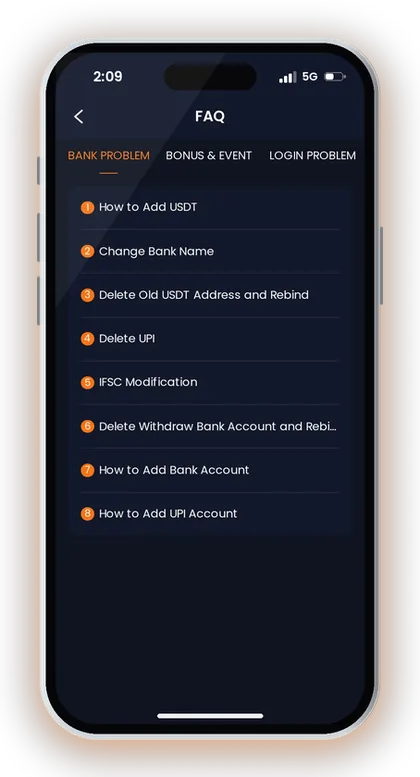
A pending status can also happen when bank, UPI or USDT details need correction. Maan Win support includes options for IFSC Modification, Delete Withdraw Bank Account and Rebind, Delete UPI and Rebind, and Delete Old USDT Address and Rebind.
- Check Cash Balance and Withdrawable before entering the amount.
- Check the selected method minimum and maximum.
- Check the Remaining Withdrawal Limit and daily limit.
- Check whether any required bet amount is still shown.
- Check that the bank, UPI, USDT or ARPay details are correct.
Balance Is Not The Same As Withdrawable
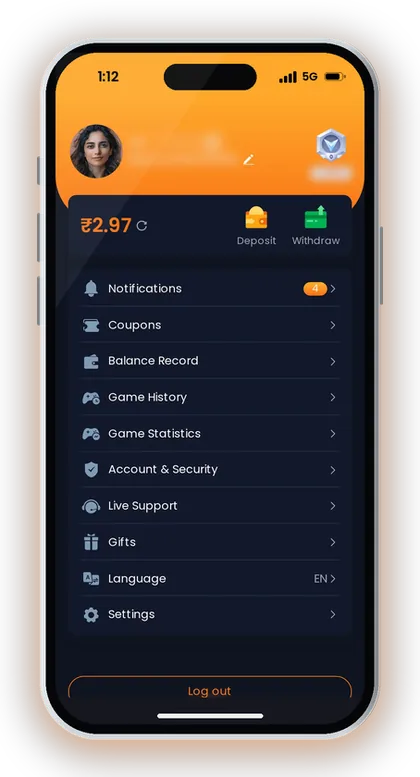
The Wallet page shows My Balance, and the Withdraw page shows Cash Balance and Withdrawable. If your Withdrawable amount is lower than your Cash Balance, the app may not allow the full amount to leave.
Before you enter an amount, compare the Withdrawable value with the method minimum. This small check prevents failed attempts and saves your daily withdrawal count.
Required Bet Amount Can Hold The Request
The Withdraw page shows a required bet amount for withdrawal. If that value is not cleared, your money may remain unavailable for withdrawal even when your Cash Balance looks enough.
Experienced players check this number before playing again or depositing more. Depositing extra without checking the requirement can increase confusion about what is available and what is locked.
Good To Know: Tip: Do not submit the maximum amount blindly; first confirm that the same amount appears under Withdrawable.
What To Check Before You Contact Support
Maan Win gives a withdrawal support route inside the Self Service Center. Before using it, you should collect the exact method, amount, account type and time of your withdrawal request.
Support can act faster when your issue is specific. “UPI withdrawal of ₹2,000 pending after 24 hours” is clearer than “money not received”.
Avoid submitting different requests for the same withdrawal unless support asks for a fresh request. Duplicate complaints can slow your own tracking because you then need to check more than one work order.
- Open the Wallet or Withdraw page and check the request status.
- Match the amount with the method limit.
- Open your bank, UPI, USDT or ARPay account and check recent credits.
- Check whether 24 hours have passed from the withdrawal time.
- Open the Self Service Center only if the amount is still not received.
- Choose the withdrawal issue and submit the details for review.
Good To Know: Tip: If your bank app is down or slow, wait and check once again before raising a support request.
Fixes For BankCard And UPI Withdrawal Issues
Maan Win supports BankCard and UPI withdrawals with a ₹110 minimum, ₹50,000 maximum and 3 withdrawals per day. These two methods suit most Indian players because the limits fit regular rupee withdrawals.
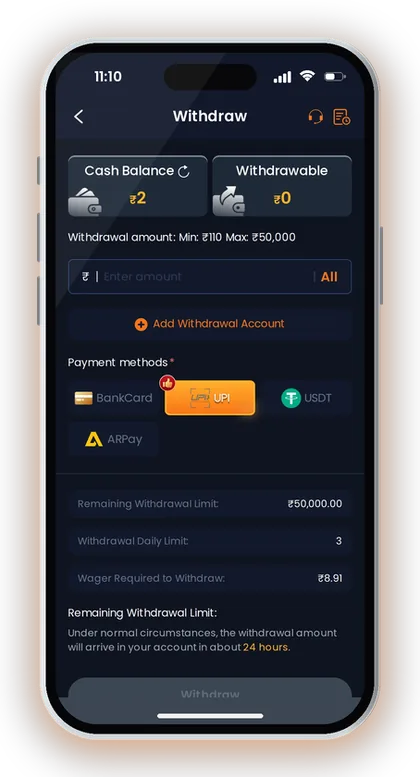
For BankCard, the most sensitive details are account number, bank name and IFSC. For UPI, the key detail is the UPI account bound to your Maan Win profile.
If you entered a wrong UPI ID or bank detail, do not keep trying new withdrawals. Use the support options for IFSC Modification, Delete Withdraw Bank Account and Rebind, Delete UPI and Rebind, or Add UPI Account as needed.
For safe account changes, read the add or change UPI and bank details steps before you rebind anything. A wrong rebind can affect your next withdrawal more than the current pending one.
UPI Pending Case
UPI withdrawals on Maan Win show the same ₹110 to ₹50,000 range as BankCard. If your UPI withdrawal is pending, first confirm that the UPI account is active in your payment app.
Say you used a UPI ID linked to an old bank account. The right fix is not another withdrawal; the right fix is to correct or rebind the UPI details through support.
BankCard Pending Case
BankCard withdrawals depend on correct bank account details. A wrong IFSC or bank name can create review work even when the amount and daily limit are valid.
If the bank detail is wrong, use the matching Self Service option instead of editing random profile fields. Keep the account holder name and bank details ready before submitting the request.
Good To Know: Tip: Use the same verified bank or UPI account for withdrawals instead of changing accounts often.
USDT And ARPay Pending Withdrawals
Maan Win USDT withdrawal starts at ₹1,000 and goes up to ₹1,000,000, while ARPay withdrawal starts at ₹100 and goes up to ₹50,000. Both methods also show 3 withdrawals per day and about 24 hours arrival time.
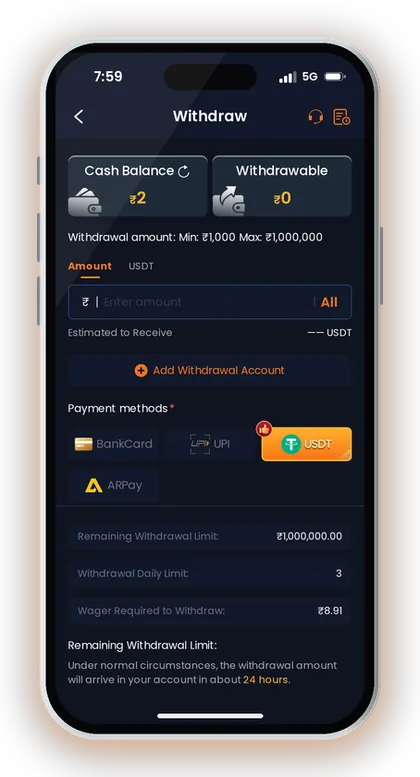
USDT is useful only when you understand the wallet address and network you are using. A wrong USDT address can create a serious issue, so check every character before adding or changing it.
ARPay requires the wallet to be activated before it can be used. If the AR wallet has not been activated, the ARPay screen shows that it cannot be used until activation is complete.
- Check the USDT amount against the ₹1,000 minimum.
- Check the USDT wallet address before every request.
- Check whether ARPay wallet activation is complete.
- Check the 3-per-day method limit before trying again.
USDT Checks
The USDT withdrawal screen shows Amount, USDT, Estimated to Receive and Add Withdrawal Account. Before submitting, check that the withdrawal amount is within the ₹1,000 to ₹1,000,000 range.
Do not treat USDT like a normal UPI transfer. Wallet address errors are harder to fix than a delayed bank credit, so use USDT only when your address is already confirmed.
ARPay Checks
The ARPay withdrawal screen can show that your AR wallet has not been activated yet. In that case, withdrawal through ARPay cannot be used until you activate the wallet.
If your ARPay withdrawal is pending after activation, check the ₹100 to ₹50,000 range and the 3-per-day limit. Then use support only after the normal arrival window has passed.
Good To Know: Tip: For small rupee balances, UPI or BankCard is usually simpler than USDT because USDT has a higher minimum on Maan Win.
Deposit History And Withdrawable Balance
Maan Win deposits are credited within 1-5 minutes, and the Deposit page says to contact customer service if a deposit does not arrive within 30 minutes. This matters because a missing deposit can change your Cash Balance and Withdrawable balance before you try to withdraw.
The Deposit page also warns you not to modify the payment amount and not to reuse saved QR codes or UPI accounts for multiple payments. If you made either mistake, fix the deposit issue first instead of raising a withdrawal complaint.
A simple example is a ₹500 UPI deposit that does not update in the balance. If you try to withdraw based on your own payment proof before the app balance updates, the Withdraw page will still follow the balance shown inside Maan Win.
Check the Maan Win deposit page when your Balance does not match your payment app. A clean deposit record makes a later withdrawal support case easier to explain.
- Open Wallet and check My Balance.
- Open Deposit history or Balance Record if available in your account.
- Compare the successful payment amount with the app balance.
- Wait up to 30 minutes for a missing deposit before contacting support.
- Raise the deposit issue first if the amount never reached the app balance.
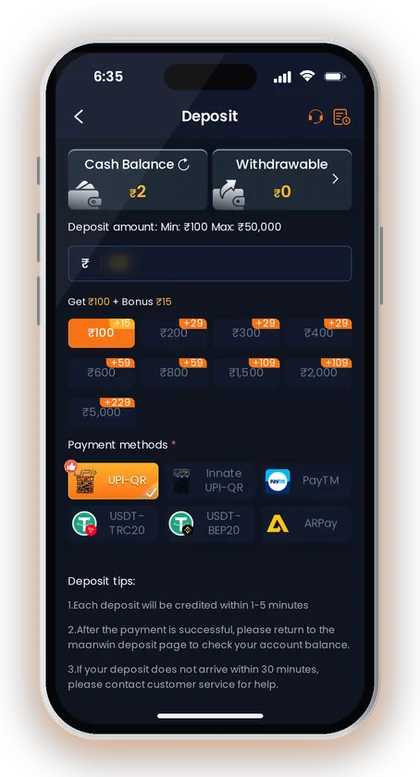
Good To Know: Tip: Never use an old saved QR code for a new deposit, because Maan Win specifically warns against reusing saved QR codes or UPI accounts.
How To Raise A Withdrawal Ticket
Maan Win Customer Service has a Self Service Center with options such as Withdrawal Problem, Deposit Not Received, IFSC Modification, Delete UPI and Rebind, and Delete Old USDT Address and Rebind. Choose the exact option that matches your issue.
If your withdrawal is still pending after the normal window, open Maan Win customer care and submit the withdrawal issue for review. After submission, use Progress Query to view the review result of your work order.
Write the amount, method and account type clearly. For example, “BankCard withdrawal ₹5,000 pending after 24 hours” gives support the information they need without extra back-and-forth.
Use one ticket for one issue. If you have both a missing deposit and a pending withdrawal, separate them because the app has different support options for each problem.
Best Ticket Details To Add
A good ticket includes the withdrawal method, amount, time and the status shown in the app. If the issue is linked to wrong details, mention whether it is BankCard, UPI, USDT or ARPay.
Do not share extra personal details that the form does not ask for. Keep the ticket focused on the transaction and the correction needed.
Use Progress Query After Submission
Maan Win shows Progress Query for checking the review result after you submit a work order. Use that route instead of creating repeated tickets for the same withdrawal.
If support asks you to rebind a payment account, use the exact rebind option shown in Self Service. Guessing the wrong support category can delay the fix.
Good To Know: Tip: Contact support after 24 hours for a delayed withdrawal unless the app shows a direct error earlier.
Before Your Next Withdrawal
Maan Win registration requires an Invite Code, and the code to enter in the Invite Code field is PUWFKWN. If you are setting up a fresh account before playing, complete the account details properly before depositing or withdrawing.
A clean account setup helps avoid avoidable withdrawal issues later. Use the Maan Win beginner guide before your first deposit if you are new to the platform.
Keep your playing budget separate from daily expense money. Real-money games like Maan Win Lottery can give random results, so only deposit an amount you are ready to use for play.
For more updates and practical account checks, read the Maan Win blog before changing payment details or claiming a bonus. Small setup mistakes can turn into withdrawal delays later.
- Use the correct mobile number and Login details.
- Enter PUWFKWN in the Invite Code field during Register.
- Add Bank Account or Bind UPI carefully before withdrawal.
- Check bonus conditions before using the balance.
- Withdraw only from the Withdrawable balance.
Account Setup Checks
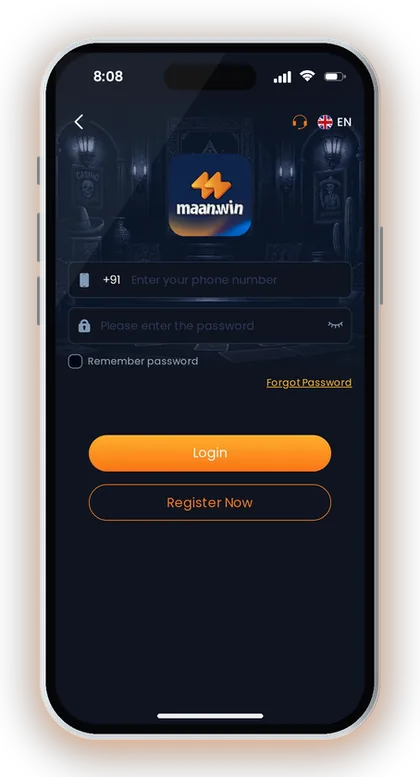
Use the same mobile number login details and keep your password safe. The Login page shows +91, Remember password, Forgot Password, Login and Register Now.
If you register, enter PUWFKWN in the required Invite Code field. Do not leave the Invite Code field blank because registration is not possible without it.
Bonus And Bet Requirement Checks
Maan Win has bonuses such as Daily Check in, Deposit Wheel, Gift Code and Agent Commission. Before you withdraw, check whether any bonus or activity has added a required bet amount to your account.
A bonus is useful only when you understand the attached condition. If your target is fast withdrawal, check the Withdrawable amount before claiming or using bonus-linked funds.
Good To Know: Tip: If you are 18+ and allowed to play in your state, set a fixed playing budget before you deposit.
Frequently Asked Questions
How long does a Maan Win withdrawal take?
Maan Win shows withdrawals arriving in about 24 hours. The Wallet page also says withdrawals normally credit within 2 hours but may take up to 24 hours, so wait for the full window before raising a delayed case.
Why is my Maan Win withdrawal pending?
Your request may be pending because it is still inside the normal processing time, the Withdrawable balance is lower than the Cash Balance, or a required bet amount is still shown. It can also happen when bank, UPI, USDT or ARPay details need correction.
What should I do if my Maan Win withdraw not received after 24 hours?
Open the Self Service Center and choose Withdrawal Problem. Submit the amount, method, time and account type, then use Progress Query to check the review result.
What is the minimum withdrawal on Maan Win?
BankCard and UPI withdrawals start at ₹110. USDT starts at ₹1,000, and ARPay starts at ₹100.
How many withdrawals can I make per day?
BankCard, UPI, USDT and ARPay each show 3 withdrawals per day. If you have already used the daily limit, wait for the next day instead of changing accounts.
Can wrong UPI or bank details delay withdrawal?
Yes, wrong payment details can create a withdrawal issue. Use the Self Service options such as Delete UPI and Rebind, IFSC Modification, or Delete Withdraw Bank Account and Rebind.
Is USDT better for withdrawal on Maan Win?
USDT has a higher range of ₹1,000 to ₹1,000,000, but it needs correct wallet details. For smaller rupee withdrawals, BankCard or UPI is usually simpler because both start at ₹110.
Read Next
Maan Win withdrawal steps, limits and timing for BankCard, UPI, USDT and ARPay. Check what to do before you withdraw mon

Maan Win customer care number help for India: use Live Support, Self Service Center, Progress Query, and fixes for depos

Maan Win deposit steps for India: UPI, USDT and ARPay limits, credit time, pending payment fixes and checks before you a

Maan Win add upi account steps, bank detail safety, Delete UPI and Rebind, IFSC help, and Customer Care checks before wi
Ready To Play On Maan Win?
Register on Maan Win in a minute and explore the games and offers.